
HBuilder5.36及以上版本app-android/app-ios平台uni-app x项目内置支持蓝牙功能,HBuilder5.36以下版本需下载插件:uni-bluetooth
# 模块介绍
蓝牙低功耗(BLE)中心设备相关接口,用于与蓝牙设备建立连接、发现其服务与特征值,并对特征值进行读写、订阅通知等操作。
# 什么是 BLE 中心设备
BLE 中的 中心设备(Central) 和 外围设备(Peripheral,也称外设) 是设备在建立蓝牙连接时承担的两种角色。在本文的使用场景中,运行应用的手机作为中心设备,蓝牙体温计、心率带、传感器等作为外围设备。
| 角色 | 主要职责 | 示例 |
|---|---|---|
| 中心设备(Central) | 扫描外围设备的广播,选择目标设备并主动发起连接。 | 手机运行应用,搜索附近的蓝牙体温计并连接。 |
| 外围设备(Peripheral) | 发送广播,让中心设备发现自己;处于可连接状态时,接受中心设备发起的连接。 | 蓝牙体温计发送广播,等待手机连接。 |
中心 和 外围 描述的是连接角色,不表示设备性能高低,也不限定数据只能单向传输。连接后,手机既可以向外设发送指令,也可以读取外设的数据,或接收外设上报的数据。角色也不是由硬件类型固定决定的,手机可承担的角色取决于系统能力和所使用的接口;本文介绍的是应用作为中心设备的用法。
例如,手机读取蓝牙体温计的数据时:
- 体温计发送广播,手机通过扫描发现它。
- 手机主动发起连接,体温计接受连接。
- 手机发现体温计提供的服务和特征值,找到用于传输温度的数据点。
- 手机按特征值支持的操作读取温度,或开启通知,在体温计上报新温度时接收数据。如果设备协议提供可写的配置特征值,手机还可以写入配置。
扫描到设备只表示收到了广播,不代表已经连接,也不保证设备当前接受连接;连接成功后,还需发现服务与特征值,才能按设备协议通信。
# 服务与特征值
连接后的数据通信通常使用 GATT(通用属性配置文件),将设备功能组织为服务和特征值:
- 服务:设备对外提供的一组功能,由 UUID 标识,可包含一个或多个特征值;
- 特征值:服务下的数据点,由 UUID 标识,其
properties描述支持的操作,如 read、write、notify、indicate 等; - UUID:用于标识服务和特征值。调用接口时,使用 uni.getBLEDeviceServices 和 uni.getBLEDeviceCharacteristics 返回的 UUID。
在上述体温计示例中,可以将“测温功能”理解为服务,将“温度数据”理解为其中的特征值。实际使用哪个 UUID、数据如何编码、是否需要先发送指令,应以设备协议为准。
GATT 还区分 客户端(Client) 和 服务端(Server):客户端发起读取、写入等请求,服务端提供服务和特征值、响应请求,并可发送通知或指示。在本文的典型场景中,手机既是 BLE 中心设备,也是 GATT 客户端;外设既是 BLE 外围设备,也是 GATT 服务端。这两组角色分别描述连接分工和数据访问分工,概念上应分别理解。
本文负责连接与数据通信,蓝牙-通用负责适配器管理与设备发现。各接口及参数的支持范围以对应的兼容性表为准。
# 使用流程
注意事项
使用前,需先按蓝牙-通用中的流程初始化适配器并发现目标设备。建立连接后,先发现服务和特征值,再进行读写或开启通知;断开连接后需重新连接并重新发现服务与特征值。
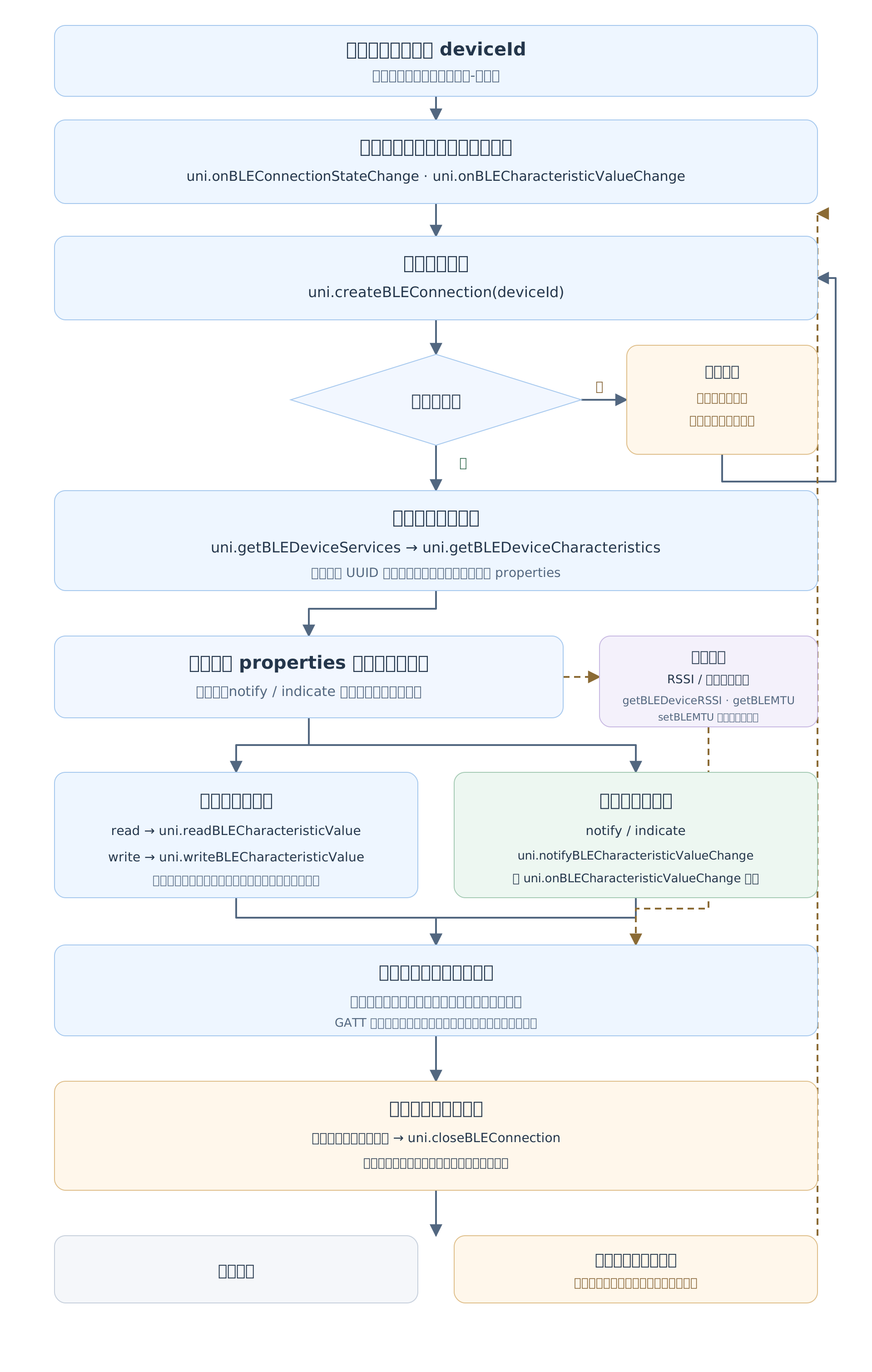
- 注册 uni.onBLEConnectionStateChange 和 uni.onBLECharacteristicValueChange,分别接收连接状态变化和特征值数据。
- 使用扫描返回的
deviceId,调用 uni.createBLEConnection 连接目标设备。 - 连接成功后,调用 uni.getBLEDeviceServices 发现服务,再调用 uni.getBLEDeviceCharacteristics 获取目标服务的特征值及其属性。
- 按特征值属性调用 uni.readBLECharacteristicValue 或 uni.writeBLECharacteristicValue。调用
readBLECharacteristicValue前需先注册onBLECharacteristicValueChange,读取结果通过该事件的value返回;读取不要求先开启通知。 - 如需接收外设主动发送的数据,调用 uni.notifyBLECharacteristicValueChange 开启通知,通过已注册的特征值变化事件监听接收数据。
- 按需调用 uni.getBLEDeviceRSSI 获取信号强度;iOS 写入长度与 MTU 的说明见 uni.getBLEMTU 和 uni.setBLEMTU。
- 不再需要通知时将其关闭;通信结束后调用 uni.closeBLEConnection,并移除当前页面或组件注册的事件监听。
# 权限
蓝牙权限与蓝牙-通用一致,请先按该页完成各端权限配置。
# 注意事项
# 通用
- 以特征值属性为准:读、写和通知分别要求特征值支持对应的操作;支持读取不代表支持通知或写入。
- 重新连接后重新发现:断线重连后,应重新获取服务与特征值,并按需开启通知,不要直接沿用上次连接的结果。
- 区分通知与事件监听:关闭外设通知需调用
notifyBLECharacteristicValueChange并传入state: false;offBLECharacteristicValueChange只移除事件监听,不能代替关闭通知。 - 按监听所属范围清理:不再使用时移除自身注册的特征值和连接状态监听。当前 iOS 插件可保存
on*返回的监听 ID,并将该 ID 传给对应的off*,避免清空其他页面的监听。 - 控制写入长度与时序:单次写入长度由平台和当前连接决定,超长数据需由业务分包;同一连接上的读写与通知配置操作宜按完成回调依次执行。
# uni.createBLEConnection(options) issues源码
创建 BLE 连接。
# createBLEConnection 兼容性 ?
# 参数
| 名称 | 类型 | 必填 | 兼容性 | 描述 | ||||||||||||||||||||||||||||||
|---|---|---|---|---|---|---|---|---|---|---|---|---|---|---|---|---|---|---|---|---|---|---|---|---|---|---|---|---|---|---|---|---|---|---|
| options | CreateBLEConnectionOptions | 是 | * | |||||||||||||||||||||||||||||||
| ||||||||||||||||||||||||||||||||||
# BLEOperationSuccess 的属性值
| 名称 | 类型 | 必备 | 兼容性 | 描述 |
|---|---|---|---|---|
| errMsg | string | 是 | 调用结果信息。 | |
| errCode | number | 否 | 错误码 | 错误码 | 错误信息 | 说明 | | - | - | - | | 0 | ok | 正常 | | -1 | already connect | 已连接 | | 10000 | not init | 未初始化蓝牙适配器 | | 10001 | not available | 当前蓝牙适配器不可用 | | 10002 | no device | 没有找到指定设备 | | 10003 | connection fail | 连接失败 | | 10004 | no service | 没有找到指定服务 | | 10005 | no characteristic | 没有找到指定特征 | | 10006 | no connection | 当前连接已断开 | | 10007 | property not support | 当前特征不支持此操作 | | 10008 | system error | 其余所有系统上报的异常 | | 10009 | system not support | Android 系统特有,系统版本低于 4.3 不支持 BLE | | 10012 | operate time out | 连接超时 | | 10013 | invalid_data | 连接 deviceId 为空或者是格式不正确 | |
# BluetoothFail 的属性值
| 名称 | 类型 | 必备 | 兼容性 | 描述 | |||||||||||||||||||||||||||||||||||||||||||||||||||||||||||||||
|---|---|---|---|---|---|---|---|---|---|---|---|---|---|---|---|---|---|---|---|---|---|---|---|---|---|---|---|---|---|---|---|---|---|---|---|---|---|---|---|---|---|---|---|---|---|---|---|---|---|---|---|---|---|---|---|---|---|---|---|---|---|---|---|---|---|---|---|
| errCode | number | 是 | uni 蓝牙适配器和 BLE 中心设备 API 可能返回的统一错误码。 | ||||||||||||||||||||||||||||||||||||||||||||||||||||||||||||||||
| |||||||||||||||||||||||||||||||||||||||||||||||||||||||||||||||||||
| mtu | number | 否 | 最终协商的 MTU 值。如果协商失败则无此参数。安卓客户端 8.0.9 开始支持。 | ||||||||||||||||||||||||||||||||||||||||||||||||||||||||||||||||
| errSubject | string | 是 | 统一错误主题(模块)名称 | ||||||||||||||||||||||||||||||||||||||||||||||||||||||||||||||||
| data | any | 否 | 错误信息中包含的数据 | ||||||||||||||||||||||||||||||||||||||||||||||||||||||||||||||||
| cause | Error | 否 | 源错误信息,可以包含多个错误,详见SourceError | ||||||||||||||||||||||||||||||||||||||||||||||||||||||||||||||||
| errMsg | string | 是 | |||||||||||||||||||||||||||||||||||||||||||||||||||||||||||||||||
# iOS 使用说明
- 先初始化适配器并扫描到目标设备,再传入扫描返回的
deviceId。能扫描到设备只表示收到了广播,不保证外设当前接受连接。 - 先注册
onBLEConnectionStateChange,再发起连接。同一设备不要并行调用多次createBLEConnection,避免重复连接导致失败。 - 在
success回调后调用getBLEDeviceServices和getBLEDeviceCharacteristics,再开始读写或开启通知。连接成功不代表服务发现、特征值发现或业务认证已完成。 timeout的单位是毫秒,应设置为大于 0 的数值,并结合真机耗时确定。当前 iOS 插件不传时不设置连接超时期限,但仍可能因系统报告失败或适配器状态变化而结束。- 当前 iOS 插件对已经连接的设备再次调用连接会返回成功。
# iOS 连接失败与超时排查
createBLEConnection 失败时,先确认适配器已初始化且可用,并使用扫描返回的 deviceId。连接成功后的服务发现、读写和通知问题,应按对应接口排查。
连接超时表示未在指定时间内完成连接,不代表设备已关机或停止广播;等待上一次断开完成也可能超时。能扫描到设备,不代表设备当前接受连接。
可按以下方向排查:
| 可能原因 | 检查与处理方式 |
|---|---|
| 信号弱或干扰 | 靠近外设,在干扰较少的环境中重试。 |
| 外设被占用或不可连接 | 断开其他手机、App 或调试工具的连接,确认外设处于可连接模式。 |
| 重复连接或断开未完成 | 同一设备只保留一个连接流程,避免并行连接或立即反复重连。 |
| 超时时间过短 | 结合正常连接耗时,适当增加 timeout 后对比。 |
| 外设重启或配对信息变化 | 重新扫描;若提示配对异常,按设备说明重新配对。持续失败时检查外设日志。 |
| 连接过多或系统暂不可用 | 关闭不必要的连接和扫描,通过 onBluetoothAdapterStateChange 确认可用后再试。 |
重试应设置间隔和次数上限,持续失败时提示用户检查设备。重连成功后,需重新发现服务和特征值,并按需开启通知。
# uni.closeBLEConnection(options) issues源码
关闭 BLE 连接。
# closeBLEConnection 兼容性 ?
# 参数
| 名称 | 类型 | 必填 | 兼容性 | 描述 | |||||||||||||||||||||||||
|---|---|---|---|---|---|---|---|---|---|---|---|---|---|---|---|---|---|---|---|---|---|---|---|---|---|---|---|---|---|
| options | CloseBLEConnectionOptions | 是 | * | ||||||||||||||||||||||||||
| |||||||||||||||||||||||||||||
# BLEOperationSuccess 的属性值
| 名称 | 类型 | 必备 | 兼容性 | 描述 |
|---|---|---|---|---|
| errMsg | string | 是 | 调用结果信息。 | |
| errCode | number | 否 | 错误码 | 错误码 | 错误信息 | 说明 | | - | - | - | | 0 | ok | 正常 | | -1 | already connect | 已连接 | | 10000 | not init | 未初始化蓝牙适配器 | | 10001 | not available | 当前蓝牙适配器不可用 | | 10002 | no device | 没有找到指定设备 | | 10003 | connection fail | 连接失败 | | 10004 | no service | 没有找到指定服务 | | 10005 | no characteristic | 没有找到指定特征 | | 10006 | no connection | 当前连接已断开 | | 10007 | property not support | 当前特征不支持此操作 | | 10008 | system error | 其余所有系统上报的异常 | | 10009 | system not support | Android 系统特有,系统版本低于 4.3 不支持 BLE | | 10012 | operate time out | 连接超时 | | 10013 | invalid_data | 连接 deviceId 为空或者是格式不正确 | |
# BluetoothFail 的属性值
| 名称 | 类型 | 必备 | 兼容性 | 描述 | |||||||||||||||||||||||||||||||||||||||||||||||||||||||||||||||
|---|---|---|---|---|---|---|---|---|---|---|---|---|---|---|---|---|---|---|---|---|---|---|---|---|---|---|---|---|---|---|---|---|---|---|---|---|---|---|---|---|---|---|---|---|---|---|---|---|---|---|---|---|---|---|---|---|---|---|---|---|---|---|---|---|---|---|---|
| errCode | number | 是 | uni 蓝牙适配器和 BLE 中心设备 API 可能返回的统一错误码。 | ||||||||||||||||||||||||||||||||||||||||||||||||||||||||||||||||
| |||||||||||||||||||||||||||||||||||||||||||||||||||||||||||||||||||
| mtu | number | 否 | 最终协商的 MTU 值。如果协商失败则无此参数。安卓客户端 8.0.9 开始支持。 | ||||||||||||||||||||||||||||||||||||||||||||||||||||||||||||||||
| errSubject | string | 是 | 统一错误主题(模块)名称 | ||||||||||||||||||||||||||||||||||||||||||||||||||||||||||||||||
| data | any | 否 | 错误信息中包含的数据 | ||||||||||||||||||||||||||||||||||||||||||||||||||||||||||||||||
| cause | Error | 否 | 源错误信息,可以包含多个错误,详见SourceError | ||||||||||||||||||||||||||||||||||||||||||||||||||||||||||||||||
| errMsg | string | 是 | |||||||||||||||||||||||||||||||||||||||||||||||||||||||||||||||||
# uni.onBLEConnectionStateChange(listener) issues源码
监听蓝牙低功耗连接状态改变事件。包括开发者主动连接或断开连接,设备丢失,连接异常断开等等。
# onBLEConnectionStateChange 兼容性 ?
# 参数
| 名称 | 类型 | 必填 | 兼容性 | 描述 |
|---|---|---|---|---|
| listener | (result: BLEConnectionStateChangeResult) => void | 是 | * |
# BLEConnectionStateChangeResult 的属性值
| 名称 | 类型 | 必备 | 兼容性 | 描述 |
|---|---|---|---|---|
| deviceId | string | 是 | 蓝牙设备 ID。 | |
| connected | boolean | 是 | 是否处于已连接状态。 |
# 返回值
| 类型 |
|---|
| number |
# uni.offBLEConnectionStateChange(listener?) issues源码
移除 BLE 连接状态变化监听。传 ID 删除对应监听,否则清空全部监听。
# offBLEConnectionStateChange 兼容性 ?
# 参数
| 名称 | 类型 | 必填 | 兼容性 | 描述 | |||||||||||||||
|---|---|---|---|---|---|---|---|---|---|---|---|---|---|---|---|---|---|---|---|
| listener | number | (result: BLEConnectionStateChangeResult) => void | 否 | * | ||||||||||||||||
| |||||||||||||||||||
# uni.getBLEDeviceRSSI(options) issues源码
获取蓝牙低功耗设备的信号强度 (Received Signal Strength Indication, RSSI)。
# getBLEDeviceRSSI 兼容性 ?
# 参数
| 名称 | 类型 | 必填 | 兼容性 | 描述 | |||||||||||||||||||||||||
|---|---|---|---|---|---|---|---|---|---|---|---|---|---|---|---|---|---|---|---|---|---|---|---|---|---|---|---|---|---|
| options | GetBLEDeviceRSSIOptions | 是 | * | ||||||||||||||||||||||||||
| |||||||||||||||||||||||||||||
# GetBLEDeviceRSSISuccess 的属性值
| 名称 | 类型 | 必备 | 兼容性 | 描述 |
|---|---|---|---|---|
| errMsg | string | 是 | 调用结果信息。 | |
| RSSI | number | 是 | 信号强度,单位 dBm。 |
# BluetoothFail 的属性值
| 名称 | 类型 | 必备 | 兼容性 | 描述 | |||||||||||||||||||||||||||||||||||||||||||||||||||||||||||||||
|---|---|---|---|---|---|---|---|---|---|---|---|---|---|---|---|---|---|---|---|---|---|---|---|---|---|---|---|---|---|---|---|---|---|---|---|---|---|---|---|---|---|---|---|---|---|---|---|---|---|---|---|---|---|---|---|---|---|---|---|---|---|---|---|---|---|---|---|
| errCode | number | 是 | uni 蓝牙适配器和 BLE 中心设备 API 可能返回的统一错误码。 | ||||||||||||||||||||||||||||||||||||||||||||||||||||||||||||||||
| |||||||||||||||||||||||||||||||||||||||||||||||||||||||||||||||||||
| mtu | number | 否 | 最终协商的 MTU 值。如果协商失败则无此参数。安卓客户端 8.0.9 开始支持。 | ||||||||||||||||||||||||||||||||||||||||||||||||||||||||||||||||
| errSubject | string | 是 | 统一错误主题(模块)名称 | ||||||||||||||||||||||||||||||||||||||||||||||||||||||||||||||||
| data | any | 否 | 错误信息中包含的数据 | ||||||||||||||||||||||||||||||||||||||||||||||||||||||||||||||||
| cause | Error | 否 | 源错误信息,可以包含多个错误,详见SourceError | ||||||||||||||||||||||||||||||||||||||||||||||||||||||||||||||||
| errMsg | string | 是 | |||||||||||||||||||||||||||||||||||||||||||||||||||||||||||||||||
# uni.getBLEMTU(options) issues源码
获取蓝牙低功耗的最大传输单元。需在 uni.createBLEConnection 调用成功后调用。
# getBLEMTU 兼容性 ?
# 参数
| 名称 | 类型 | 必填 | 兼容性 | 描述 | ||||||||||||||||||||||||||||||||||||||||||||
|---|---|---|---|---|---|---|---|---|---|---|---|---|---|---|---|---|---|---|---|---|---|---|---|---|---|---|---|---|---|---|---|---|---|---|---|---|---|---|---|---|---|---|---|---|---|---|---|---|
| options | GetBLEMTUOptions | 是 | * | |||||||||||||||||||||||||||||||||||||||||||||
| ||||||||||||||||||||||||||||||||||||||||||||||||
# GetBLEMTUSuccess 的属性值
| 名称 | 类型 | 必备 | 兼容性 | 描述 |
|---|---|---|---|---|
| errMsg | string | 是 | 调用结果信息。 | |
| mtu | number | 是 | 最大传输单元,单位 bytes。 |
# BluetoothFail 的属性值
| 名称 | 类型 | 必备 | 兼容性 | 描述 | |||||||||||||||||||||||||||||||||||||||||||||||||||||||||||||||
|---|---|---|---|---|---|---|---|---|---|---|---|---|---|---|---|---|---|---|---|---|---|---|---|---|---|---|---|---|---|---|---|---|---|---|---|---|---|---|---|---|---|---|---|---|---|---|---|---|---|---|---|---|---|---|---|---|---|---|---|---|---|---|---|---|---|---|---|
| errCode | number | 是 | uni 蓝牙适配器和 BLE 中心设备 API 可能返回的统一错误码。 | ||||||||||||||||||||||||||||||||||||||||||||||||||||||||||||||||
| |||||||||||||||||||||||||||||||||||||||||||||||||||||||||||||||||||
| mtu | number | 否 | 最终协商的 MTU 值。如果协商失败则无此参数。安卓客户端 8.0.9 开始支持。 | ||||||||||||||||||||||||||||||||||||||||||||||||||||||||||||||||
| errSubject | string | 是 | 统一错误主题(模块)名称 | ||||||||||||||||||||||||||||||||||||||||||||||||||||||||||||||||
| data | any | 否 | 错误信息中包含的数据 | ||||||||||||||||||||||||||||||||||||||||||||||||||||||||||||||||
| cause | Error | 否 | 源错误信息,可以包含多个错误,详见SourceError | ||||||||||||||||||||||||||||||||||||||||||||||||||||||||||||||||
| errMsg | string | 是 | |||||||||||||||||||||||||||||||||||||||||||||||||||||||||||||||||
# iOS 注意事项
- 当前 iOS 插件返回的
mtu是指定writeType对应的最大可写数据长度,单位为字节,不是 ATT MTU;不传writeType时按write查询。 - 直接以返回值作为该写模式的单次写入长度上限,无需再减 3,也不能通过加 3 推算 ATT MTU。查询时的
writeType应与实际写入时一致。 - 返回的长度上限不代表外设业务协议支持任意长度的数据,分包还需遵循设备协议。
# uni.setBLEMTU(options) issues源码
设置最大传输单元,仅 Android 支持。
# setBLEMTU 兼容性 ?
# 参数
| 名称 | 类型 | 必填 | 兼容性 | 描述 | ||||||||||||||||||||||||||||||
|---|---|---|---|---|---|---|---|---|---|---|---|---|---|---|---|---|---|---|---|---|---|---|---|---|---|---|---|---|---|---|---|---|---|---|
| options | SetBLEMTUOptions | 是 | 仅 Android 支持。 | |||||||||||||||||||||||||||||||
| ||||||||||||||||||||||||||||||||||
# SetBLEMTUSuccess 的属性值
| 名称 | 类型 | 必备 | 兼容性 | 描述 |
|---|---|---|---|---|
| errMsg | string | 是 | 调用结果信息。 | |
| mtu | number | 是 | 最终协商的 MTU 值,与传入参数一致,单位 bytes。 |
# BluetoothFail 的属性值
| 名称 | 类型 | 必备 | 兼容性 | 描述 | |||||||||||||||||||||||||||||||||||||||||||||||||||||||||||||||
|---|---|---|---|---|---|---|---|---|---|---|---|---|---|---|---|---|---|---|---|---|---|---|---|---|---|---|---|---|---|---|---|---|---|---|---|---|---|---|---|---|---|---|---|---|---|---|---|---|---|---|---|---|---|---|---|---|---|---|---|---|---|---|---|---|---|---|---|
| errCode | number | 是 | uni 蓝牙适配器和 BLE 中心设备 API 可能返回的统一错误码。 | ||||||||||||||||||||||||||||||||||||||||||||||||||||||||||||||||
| |||||||||||||||||||||||||||||||||||||||||||||||||||||||||||||||||||
| mtu | number | 否 | 最终协商的 MTU 值。如果协商失败则无此参数。安卓客户端 8.0.9 开始支持。 | ||||||||||||||||||||||||||||||||||||||||||||||||||||||||||||||||
| errSubject | string | 是 | 统一错误主题(模块)名称 | ||||||||||||||||||||||||||||||||||||||||||||||||||||||||||||||||
| data | any | 否 | 错误信息中包含的数据 | ||||||||||||||||||||||||||||||||||||||||||||||||||||||||||||||||
| cause | Error | 否 | 源错误信息,可以包含多个错误,详见SourceError | ||||||||||||||||||||||||||||||||||||||||||||||||||||||||||||||||
| errMsg | string | 是 | |||||||||||||||||||||||||||||||||||||||||||||||||||||||||||||||||
# iOS 注意事项
iOS 不支持主动设置 MTU,当前插件调用此接口会执行 fail 和 complete,返回不支持错误。写入前可通过 getBLEMTU 查询对应写模式的最大可写长度。
# uni.onBLEMTUChange(listener) issues源码
监听 MTU 变化,仅 Android 支持。
# onBLEMTUChange 兼容性 ?
# 参数
| 名称 | 类型 | 必填 | 兼容性 | 描述 |
|---|---|---|---|---|
| listener | (result: BLEMTUChangeResult) => void | 是 | * |
# BLEMTUChangeResult 的属性值
| 名称 | 类型 | 必备 | 兼容性 | 描述 |
|---|---|---|---|---|
| deviceId | string | 是 | 蓝牙设备 ID。 | |
| mtu | number | 是 | 最大传输单元,单位 bytes。 |
# 返回值
| 类型 |
|---|
| number |
# uni.offBLEMTUChange(listener?) issues源码
移除 MTU 变化监听,仅 Android 支持。传 ID 删除对应监听,否则清空全部监听。
# offBLEMTUChange 兼容性 ?
# 参数
| 名称 | 类型 | 必填 | 兼容性 | 描述 | |||||||||||||||
|---|---|---|---|---|---|---|---|---|---|---|---|---|---|---|---|---|---|---|---|
| listener | number | (result: BLEMTUChangeResult) => void | 否 | * | ||||||||||||||||
| |||||||||||||||||||
# uni.getBLEDeviceServices(options) issues源码
获取蓝牙低功耗设备所有服务 (service)。
# getBLEDeviceServices 兼容性 ?
# 参数
| 名称 | 类型 | 必填 | 兼容性 | 描述 | |||||||||||||||||||||||||
|---|---|---|---|---|---|---|---|---|---|---|---|---|---|---|---|---|---|---|---|---|---|---|---|---|---|---|---|---|---|
| options | GetBLEDeviceServicesOptions | 是 | * | ||||||||||||||||||||||||||
| |||||||||||||||||||||||||||||
# GetBLEDeviceServicesSuccess 的属性值
| 名称 | 类型 | 必备 | 兼容性 | 描述 | |||||||||||||||
|---|---|---|---|---|---|---|---|---|---|---|---|---|---|---|---|---|---|---|---|
| errMsg | string | 是 | 调用结果信息。 | ||||||||||||||||
| services | Array<BLEService> | 是 | 设备服务列表。 | ||||||||||||||||
| |||||||||||||||||||
# BluetoothFail 的属性值
| 名称 | 类型 | 必备 | 兼容性 | 描述 | |||||||||||||||||||||||||||||||||||||||||||||||||||||||||||||||
|---|---|---|---|---|---|---|---|---|---|---|---|---|---|---|---|---|---|---|---|---|---|---|---|---|---|---|---|---|---|---|---|---|---|---|---|---|---|---|---|---|---|---|---|---|---|---|---|---|---|---|---|---|---|---|---|---|---|---|---|---|---|---|---|---|---|---|---|
| errCode | number | 是 | uni 蓝牙适配器和 BLE 中心设备 API 可能返回的统一错误码。 | ||||||||||||||||||||||||||||||||||||||||||||||||||||||||||||||||
| |||||||||||||||||||||||||||||||||||||||||||||||||||||||||||||||||||
| mtu | number | 否 | 最终协商的 MTU 值。如果协商失败则无此参数。安卓客户端 8.0.9 开始支持。 | ||||||||||||||||||||||||||||||||||||||||||||||||||||||||||||||||
| errSubject | string | 是 | 统一错误主题(模块)名称 | ||||||||||||||||||||||||||||||||||||||||||||||||||||||||||||||||
| data | any | 否 | 错误信息中包含的数据 | ||||||||||||||||||||||||||||||||||||||||||||||||||||||||||||||||
| cause | Error | 否 | 源错误信息,可以包含多个错误,详见SourceError | ||||||||||||||||||||||||||||||||||||||||||||||||||||||||||||||||
| errMsg | string | 是 | |||||||||||||||||||||||||||||||||||||||||||||||||||||||||||||||||
# uni.getBLEDeviceCharacteristics(options) issues源码
获取蓝牙低功耗设备某个服务中所有特征 (characteristic)。
# getBLEDeviceCharacteristics 兼容性 ?
# 参数
| 名称 | 类型 | 必填 | 兼容性 | 描述 | ||||||||||||||||||||||||||||||
|---|---|---|---|---|---|---|---|---|---|---|---|---|---|---|---|---|---|---|---|---|---|---|---|---|---|---|---|---|---|---|---|---|---|---|
| options | GetBLEDeviceCharacteristicsOptions | 是 | * | |||||||||||||||||||||||||||||||
| ||||||||||||||||||||||||||||||||||
# GetBLEDeviceCharacteristicsSuccess 的属性值
| 名称 | 类型 | 必备 | 兼容性 | 描述 | |||||||||||||||||||||||||||||||||||||||||||||||||||||||
|---|---|---|---|---|---|---|---|---|---|---|---|---|---|---|---|---|---|---|---|---|---|---|---|---|---|---|---|---|---|---|---|---|---|---|---|---|---|---|---|---|---|---|---|---|---|---|---|---|---|---|---|---|---|---|---|---|---|---|---|
| errMsg | string | 是 | 调用结果信息。 | ||||||||||||||||||||||||||||||||||||||||||||||||||||||||
| characteristics | Array<BLECharacteristic> | 是 | 设备特征列表。 | ||||||||||||||||||||||||||||||||||||||||||||||||||||||||
| |||||||||||||||||||||||||||||||||||||||||||||||||||||||||||
# BluetoothFail 的属性值
| 名称 | 类型 | 必备 | 兼容性 | 描述 | |||||||||||||||||||||||||||||||||||||||||||||||||||||||||||||||
|---|---|---|---|---|---|---|---|---|---|---|---|---|---|---|---|---|---|---|---|---|---|---|---|---|---|---|---|---|---|---|---|---|---|---|---|---|---|---|---|---|---|---|---|---|---|---|---|---|---|---|---|---|---|---|---|---|---|---|---|---|---|---|---|---|---|---|---|
| errCode | number | 是 | uni 蓝牙适配器和 BLE 中心设备 API 可能返回的统一错误码。 | ||||||||||||||||||||||||||||||||||||||||||||||||||||||||||||||||
| |||||||||||||||||||||||||||||||||||||||||||||||||||||||||||||||||||
| mtu | number | 否 | 最终协商的 MTU 值。如果协商失败则无此参数。安卓客户端 8.0.9 开始支持。 | ||||||||||||||||||||||||||||||||||||||||||||||||||||||||||||||||
| errSubject | string | 是 | 统一错误主题(模块)名称 | ||||||||||||||||||||||||||||||||||||||||||||||||||||||||||||||||
| data | any | 否 | 错误信息中包含的数据 | ||||||||||||||||||||||||||||||||||||||||||||||||||||||||||||||||
| cause | Error | 否 | 源错误信息,可以包含多个错误,详见SourceError | ||||||||||||||||||||||||||||||||||||||||||||||||||||||||||||||||
| errMsg | string | 是 | |||||||||||||||||||||||||||||||||||||||||||||||||||||||||||||||||
# uni.readBLECharacteristicValue(options) issues源码
读取蓝牙低功耗设备特征值的二进制数据。注意:必须设备的特征支持 read 才可以成功调用;读取结果通过 onBLECharacteristicValueChange 返回。
# readBLECharacteristicValue 兼容性 ?
# 参数
| 名称 | 类型 | 必填 | 兼容性 | 描述 | |||||||||||||||||||||||||||||||||||
|---|---|---|---|---|---|---|---|---|---|---|---|---|---|---|---|---|---|---|---|---|---|---|---|---|---|---|---|---|---|---|---|---|---|---|---|---|---|---|---|
| options | ReadBLECharacteristicValueOptions | 是 | * | ||||||||||||||||||||||||||||||||||||
| |||||||||||||||||||||||||||||||||||||||
# BLEOperationSuccess 的属性值
| 名称 | 类型 | 必备 | 兼容性 | 描述 |
|---|---|---|---|---|
| errMsg | string | 是 | 调用结果信息。 | |
| errCode | number | 否 | 错误码 | 错误码 | 错误信息 | 说明 | | - | - | - | | 0 | ok | 正常 | | -1 | already connect | 已连接 | | 10000 | not init | 未初始化蓝牙适配器 | | 10001 | not available | 当前蓝牙适配器不可用 | | 10002 | no device | 没有找到指定设备 | | 10003 | connection fail | 连接失败 | | 10004 | no service | 没有找到指定服务 | | 10005 | no characteristic | 没有找到指定特征 | | 10006 | no connection | 当前连接已断开 | | 10007 | property not support | 当前特征不支持此操作 | | 10008 | system error | 其余所有系统上报的异常 | | 10009 | system not support | Android 系统特有,系统版本低于 4.3 不支持 BLE | | 10012 | operate time out | 连接超时 | | 10013 | invalid_data | 连接 deviceId 为空或者是格式不正确 | |
# BluetoothFail 的属性值
| 名称 | 类型 | 必备 | 兼容性 | 描述 | |||||||||||||||||||||||||||||||||||||||||||||||||||||||||||||||
|---|---|---|---|---|---|---|---|---|---|---|---|---|---|---|---|---|---|---|---|---|---|---|---|---|---|---|---|---|---|---|---|---|---|---|---|---|---|---|---|---|---|---|---|---|---|---|---|---|---|---|---|---|---|---|---|---|---|---|---|---|---|---|---|---|---|---|---|
| errCode | number | 是 | uni 蓝牙适配器和 BLE 中心设备 API 可能返回的统一错误码。 | ||||||||||||||||||||||||||||||||||||||||||||||||||||||||||||||||
| |||||||||||||||||||||||||||||||||||||||||||||||||||||||||||||||||||
| mtu | number | 否 | 最终协商的 MTU 值。如果协商失败则无此参数。安卓客户端 8.0.9 开始支持。 | ||||||||||||||||||||||||||||||||||||||||||||||||||||||||||||||||
| errSubject | string | 是 | 统一错误主题(模块)名称 | ||||||||||||||||||||||||||||||||||||||||||||||||||||||||||||||||
| data | any | 否 | 错误信息中包含的数据 | ||||||||||||||||||||||||||||||||||||||||||||||||||||||||||||||||
| cause | Error | 否 | 源错误信息,可以包含多个错误,详见SourceError | ||||||||||||||||||||||||||||||||||||||||||||||||||||||||||||||||
| errMsg | string | 是 | |||||||||||||||||||||||||||||||||||||||||||||||||||||||||||||||||
# 注意事项
- 先注册
onBLECharacteristicValueChange,再发起读取。读取结果通过该事件的value返回,readBLECharacteristicValue的成功回调不包含特征值数据。 - 主动读取要求特征值支持
read,无需先调用notifyBLECharacteristicValueChange开启通知。 - 多设备或多特征值共用事件监听时,应按事件中的
deviceId、serviceId和characteristicId匹配数据来源。
# uni.writeBLECharacteristicValue(options) issues源码
向蓝牙低功耗设备特征值中写入二进制数据。注意:必须设备的特征支持 write 才可以成功调用。
# writeBLECharacteristicValue 兼容性 ?
# 参数
| 名称 | 类型 | 必填 | 兼容性 | 描述 | |||||||||||||||||||||||||||||||||||||||||||||||||||||||||||
|---|---|---|---|---|---|---|---|---|---|---|---|---|---|---|---|---|---|---|---|---|---|---|---|---|---|---|---|---|---|---|---|---|---|---|---|---|---|---|---|---|---|---|---|---|---|---|---|---|---|---|---|---|---|---|---|---|---|---|---|---|---|---|---|
| options | WriteBLECharacteristicValueOptions | 是 | * | ||||||||||||||||||||||||||||||||||||||||||||||||||||||||||||
| |||||||||||||||||||||||||||||||||||||||||||||||||||||||||||||||
# BLEOperationSuccess 的属性值
| 名称 | 类型 | 必备 | 兼容性 | 描述 |
|---|---|---|---|---|
| errMsg | string | 是 | 调用结果信息。 | |
| errCode | number | 否 | 错误码 | 错误码 | 错误信息 | 说明 | | - | - | - | | 0 | ok | 正常 | | -1 | already connect | 已连接 | | 10000 | not init | 未初始化蓝牙适配器 | | 10001 | not available | 当前蓝牙适配器不可用 | | 10002 | no device | 没有找到指定设备 | | 10003 | connection fail | 连接失败 | | 10004 | no service | 没有找到指定服务 | | 10005 | no characteristic | 没有找到指定特征 | | 10006 | no connection | 当前连接已断开 | | 10007 | property not support | 当前特征不支持此操作 | | 10008 | system error | 其余所有系统上报的异常 | | 10009 | system not support | Android 系统特有,系统版本低于 4.3 不支持 BLE | | 10012 | operate time out | 连接超时 | | 10013 | invalid_data | 连接 deviceId 为空或者是格式不正确 | |
# BluetoothFail 的属性值
| 名称 | 类型 | 必备 | 兼容性 | 描述 | |||||||||||||||||||||||||||||||||||||||||||||||||||||||||||||||
|---|---|---|---|---|---|---|---|---|---|---|---|---|---|---|---|---|---|---|---|---|---|---|---|---|---|---|---|---|---|---|---|---|---|---|---|---|---|---|---|---|---|---|---|---|---|---|---|---|---|---|---|---|---|---|---|---|---|---|---|---|---|---|---|---|---|---|---|
| errCode | number | 是 | uni 蓝牙适配器和 BLE 中心设备 API 可能返回的统一错误码。 | ||||||||||||||||||||||||||||||||||||||||||||||||||||||||||||||||
| |||||||||||||||||||||||||||||||||||||||||||||||||||||||||||||||||||
| mtu | number | 否 | 最终协商的 MTU 值。如果协商失败则无此参数。安卓客户端 8.0.9 开始支持。 | ||||||||||||||||||||||||||||||||||||||||||||||||||||||||||||||||
| errSubject | string | 是 | 统一错误主题(模块)名称 | ||||||||||||||||||||||||||||||||||||||||||||||||||||||||||||||||
| data | any | 否 | 错误信息中包含的数据 | ||||||||||||||||||||||||||||||||||||||||||||||||||||||||||||||||
| cause | Error | 否 | 源错误信息,可以包含多个错误,详见SourceError | ||||||||||||||||||||||||||||||||||||||||||||||||||||||||||||||||
| errMsg | string | 是 | |||||||||||||||||||||||||||||||||||||||||||||||||||||||||||||||||
# 注意事项
- 应根据特征值属性选择
writeType:write为有响应写,writeNoResponse为无响应写。当前 iOS 插件不传时使用write,不会因特征值只支持无响应写而自动切换;此时需显式传入writeNoResponse。 - 当前 iOS 插件不会自动分包。超过单次写入长度上限时,会调用
fail和complete,需按长度上限与设备协议自行分包,详见 getBLEMTU 的 iOS 注意事项。 - 无响应写缺少外设对本次写入的协议层确认。若业务需要确认设备已接收或处理数据,应设计应用层应答机制。
# uni.notifyBLECharacteristicValueChange(options) issues源码
启用蓝牙低功耗设备特征值变化时的 notify 功能,订阅特征。注意:必须设备的特征支持 notify 或者 indicate 才可以成功调用。另外,必须先启用 uni.notifyBLECharacteristicValueChange 才能监听到设备 characteristicValueChange 事件。
# notifyBLECharacteristicValueChange 兼容性 ?
# 参数
| 名称 | 类型 | 必填 | 兼容性 | 描述 | |||||||||||||||||||||||||||||||||||||||||||||||||||||||||||
|---|---|---|---|---|---|---|---|---|---|---|---|---|---|---|---|---|---|---|---|---|---|---|---|---|---|---|---|---|---|---|---|---|---|---|---|---|---|---|---|---|---|---|---|---|---|---|---|---|---|---|---|---|---|---|---|---|---|---|---|---|---|---|---|
| options | NotifyBLECharacteristicValueChangeOptions | 是 | * | ||||||||||||||||||||||||||||||||||||||||||||||||||||||||||||
| |||||||||||||||||||||||||||||||||||||||||||||||||||||||||||||||
# BLEOperationSuccess 的属性值
| 名称 | 类型 | 必备 | 兼容性 | 描述 |
|---|---|---|---|---|
| errMsg | string | 是 | 调用结果信息。 | |
| errCode | number | 否 | 错误码 | 错误码 | 错误信息 | 说明 | | - | - | - | | 0 | ok | 正常 | | -1 | already connect | 已连接 | | 10000 | not init | 未初始化蓝牙适配器 | | 10001 | not available | 当前蓝牙适配器不可用 | | 10002 | no device | 没有找到指定设备 | | 10003 | connection fail | 连接失败 | | 10004 | no service | 没有找到指定服务 | | 10005 | no characteristic | 没有找到指定特征 | | 10006 | no connection | 当前连接已断开 | | 10007 | property not support | 当前特征不支持此操作 | | 10008 | system error | 其余所有系统上报的异常 | | 10009 | system not support | Android 系统特有,系统版本低于 4.3 不支持 BLE | | 10012 | operate time out | 连接超时 | | 10013 | invalid_data | 连接 deviceId 为空或者是格式不正确 | |
# BluetoothFail 的属性值
| 名称 | 类型 | 必备 | 兼容性 | 描述 | |||||||||||||||||||||||||||||||||||||||||||||||||||||||||||||||
|---|---|---|---|---|---|---|---|---|---|---|---|---|---|---|---|---|---|---|---|---|---|---|---|---|---|---|---|---|---|---|---|---|---|---|---|---|---|---|---|---|---|---|---|---|---|---|---|---|---|---|---|---|---|---|---|---|---|---|---|---|---|---|---|---|---|---|---|
| errCode | number | 是 | uni 蓝牙适配器和 BLE 中心设备 API 可能返回的统一错误码。 | ||||||||||||||||||||||||||||||||||||||||||||||||||||||||||||||||
| |||||||||||||||||||||||||||||||||||||||||||||||||||||||||||||||||||
| mtu | number | 否 | 最终协商的 MTU 值。如果协商失败则无此参数。安卓客户端 8.0.9 开始支持。 | ||||||||||||||||||||||||||||||||||||||||||||||||||||||||||||||||
| errSubject | string | 是 | 统一错误主题(模块)名称 | ||||||||||||||||||||||||||||||||||||||||||||||||||||||||||||||||
| data | any | 否 | 错误信息中包含的数据 | ||||||||||||||||||||||||||||||||||||||||||||||||||||||||||||||||
| cause | Error | 否 | 源错误信息,可以包含多个错误,详见SourceError | ||||||||||||||||||||||||||||||||||||||||||||||||||||||||||||||||
| errMsg | string | 是 | |||||||||||||||||||||||||||||||||||||||||||||||||||||||||||||||||
# 注意事项
- 先注册
onBLECharacteristicValueChange,再传入state: true开启通知;特征值需支持notify或indicate。 - 开启成功表示通知配置完成,不代表外设会立即发送数据;是否上报、何时上报由设备协议决定。
- 不再需要通知时传入
state: false。断线重连后如需继续接收通知,应重新发现服务和特征值并再次开启通知。
# uni.onBLECharacteristicValueChange(listener) issues源码
监听蓝牙低功耗设备的特征值变化事件。必须先调用 uni.notifyBLECharacteristicValueChange 接口才能接收到设备推送的 notification。
# onBLECharacteristicValueChange 兼容性 ?
# 参数
| 名称 | 类型 | 必填 | 兼容性 | 描述 |
|---|---|---|---|---|
| listener | (result: BLECharacteristicValueChangeResult) => void | 是 | * |
# BLECharacteristicValueChangeResult 的属性值
| 名称 | 类型 | 必备 | 兼容性 | 描述 |
|---|---|---|---|---|
| deviceId | string | 是 | 蓝牙设备 ID。 | |
| serviceId | string | 是 | 蓝牙特征对应服务的 UUID。 | |
| characteristicId | string | 是 | 蓝牙特征的 UUID。 | |
| value | ArrayBuffer | 是 | 特征最新的二进制值。 |
# 返回值
| 类型 |
|---|
| number |
# uni.offBLECharacteristicValueChange(listener?) issues源码
移除 BLE 特征值变化监听。传 ID 删除对应监听,否则清空全部监听。
# offBLECharacteristicValueChange 兼容性 ?
# 参数
| 名称 | 类型 | 必填 | 兼容性 | 描述 | |||||||||||||||||||||||||
|---|---|---|---|---|---|---|---|---|---|---|---|---|---|---|---|---|---|---|---|---|---|---|---|---|---|---|---|---|---|
| listener | number | (result: BLECharacteristicValueChangeResult) => void | 否 | * | ||||||||||||||||||||||||||
| |||||||||||||||||||||||||||||
# 示例
示例为hello uni-app x alpha分支,与最新HBuilderX Alpha版同步。与最新正式版同步的master分支示例另见
该 API 不支持 Web,请运行 hello uni-app x 到 App 平台体验
<template>
	<view class="page">
		<view id="ble-log-panel" class="log-panel">
			<view class="log-header">
				<text class="log-title">Log</text>
				<button class="log-clear" size="mini" @click="clearLogs">清空</button>
			</view>
			<scroll-view class="log-list" direction="vertical" :show-scrollbar="true">
				<text v-if="logs.length == 0" class="log-empty">暂无日志</text>
				<text v-for="(item, index) in logs" :key="index" class="log-item">{{ item }}</text>
			</scroll-view>
		</view>

		<scroll-view class="workflow-scroll" direction="vertical" :show-scrollbar="true">
			<view class="workflow-content">
				<view class="status-strip">
					<view class="status-item">
						<text class="status-label">适配器</text>
						<text class="status-value">{{ adapterOpened ? '已打开' : '未打开' }}</text>
					</view>
					<view class="status-item">
						<text class="status-label">扫描</text>
						<text class="status-value">{{ discovering ? '进行中' : '已停止' }}</text>
					</view>
					<view class="status-item">
						<text class="status-label">连接</text>
						<text class="status-value">{{ connected ? '已连接' : '未连接' }}</text>
					</view>
					<view class="status-item status-item-last">
						<text class="status-label">设备</text>
						<text class="status-value">{{ devices.length }}</text>
					</view>
				</view>

				<view class="workflow-section">
					<view class="section-heading">
						<text class="section-title section-title-inline">1. 发现设备</text>
						<button class="fold-button" size="mini" @click="devicesExpanded = !devicesExpanded">{{ devicesExpanded ? '收起' : '展开' }}</button>
					</view>
					<view class="api-action-row">
						<text class="api-name">uni.startBluetoothDevicesDiscovery</text>
						<button id="test-start-bluetooth-devices-discovery" class="call-button" size="mini" type="primary" :disabled="!adapterOpened"
							@click="toggleDiscovery">{{ discovering ? '停止' : '扫描' }}</button>
					</view>
					<view v-if="selectedDevice != null" class="selected-device-band">
						<view class="selected-device-main">
							<text class="selected-device-label">已选设备</text>
							<text class="selected-device-name">{{ selectedDevice!.name }}</text>
							<text class="selected-device-id">{{ selectedDevice!.deviceId }}</text>
						</view>
						<text class="selected-device-rssi">{{ selectedDevice!.RSSI }} dBm</text>
					</view>
					<scroll-view v-if="devicesExpanded" class="device-list" direction="vertical" :show-scrollbar="true">
						<view v-if="devices.length == 0" class="empty-row">
							<text class="empty-text">未发现可连接设备</text>
						</view>
						<view v-for="device in devices" :key="device.deviceId" class="select-row"
							:class="selectedDeviceId == device.deviceId ? 'select-row-active' : ''">
							<view class="select-main">
								<text class="select-title">{{ device.name }}</text>
								<text class="select-id">{{ device.deviceId }}</text>
							</view>
							<text class="select-meta">{{ device.RSSI }} dBm</text>
							<button class="select-button" size="mini" @click="selectDevice(device.deviceId)">{{ selectedDeviceId == device.deviceId ? '已选' : '选择' }}</button>
						</view>
					</scroll-view>
				</view>

				<view class="workflow-section">
					<text class="section-title">2. 连接与链路</text>
					<view class="listener-row">
						<text class="listener-name">uni.onBLEConnectionStateChange</text>
						<button id="test-on-ble-connection-state-change" class="listener-button" size="mini" type="primary" @click="onConnectionStateChange">监听</button>
					</view>
					<view class="listener-row">
						<text class="listener-name">uni.offBLEConnectionStateChange</text>
						<button id="test-off-ble-connection-state-change" class="listener-button" size="mini" @click="offConnectionStateChange">取消</button>
					</view>
					<view class="api-action-row api-row-border">
						<text class="api-name">uni.createBLEConnection</text>
						<button id="test-create-ble-connection" class="call-button" size="mini" type="primary" :disabled="selectedDeviceId.length == 0 || connected"
							@click="connectDevice">连接</button>
					</view>
					<view class="api-action-row api-row-border">
						<text class="api-name">uni.closeBLEConnection</text>
						<button id="test-close-ble-connection" class="call-button" size="mini" :disabled="!connected" @click="disconnectDevice">断开</button>
					</view>
					<view class="api-action-row api-row-border">
						<text class="api-name">uni.getBLEDeviceRSSI</text>
						<text class="result-value">{{ rssiText }}</text>
						<button id="test-get-ble-device-rssi" class="call-button" size="mini" :disabled="!connected" @click="getRSSI">查询</button>
					</view>
					<view class="api-action-row api-row-border">
						<text class="api-name">uni.getBLEMTU</text>
						<text class="result-value">{{ mtuText }}</text>
						<button id="test-get-ble-mtu" class="call-button" size="mini" :disabled="!connected" @click="getMTU">查询</button>
					</view>
					<!-- #ifdef APP-ANDROID -->
					<view class="parameter-row">
						<text class="parameter-name">MTU</text>
						<input v-model="mtuInput" class="parameter-input parameter-input-short" type="number" placeholder="185" />
					</view>
					<view class="api-action-row">
						<text class="api-name">uni.setBLEMTU</text>
						<button id="test-set-ble-mtu" class="call-button" size="mini" :disabled="!connected" @click="setMTU">设置</button>
					</view>
					<view class="listener-row api-row-border">
						<text class="listener-name">uni.onBLEMTUChange</text>
						<button id="test-on-ble-mtu-change" class="listener-button" size="mini" type="primary" @click="onMTUChange">监听</button>
					</view>
					<view class="listener-row">
						<text class="listener-name">uni.offBLEMTUChange</text>
						<button id="test-off-ble-mtu-change" class="listener-button" size="mini" @click="offMTUChange">取消</button>
					</view>
					<!-- #endif -->
				</view>

				<view class="workflow-section">
					<text class="section-title">3. 服务与特征</text>
					<view class="api-action-row">
						<text class="api-name">uni.getBLEDeviceServices</text>
						<button id="test-get-ble-device-services" class="call-button" size="mini" type="primary" :disabled="!connected" @click="getServices">查询</button>
					</view>
					<view v-if="selectedService != null" class="selected-device-band">
						<view class="selected-device-main">
							<text class="selected-device-label">已选 Service</text>
							<text class="selected-device-name">{{ selectedService!.isPrimary ? 'Primary Service' : 'Service' }}</text>
							<text class="selected-device-id">{{ selectedService!.uuid }}</text>
						</view>
					</view>
					<view class="result-heading">
						<text class="result-title">Services ({{ services.length }})</text>
						<button class="fold-button fold-button-compact" size="mini" @click="servicesExpanded = !servicesExpanded">{{ servicesExpanded ? '收起' : '展开' }}</button>
					</view>
					<scroll-view v-if="servicesExpanded" class="result-list" direction="vertical" :show-scrollbar="true">
						<view v-if="services.length == 0" class="empty-row">
							<text class="empty-text">暂无服务</text>
						</view>
						<view v-for="service in services" :key="service.uuid" class="select-row"
							:class="selectedServiceId == service.uuid ? 'select-row-active' : ''">
							<view class="select-main">
								<text class="select-title">{{ service.isPrimary ? 'Primary Service' : 'Service' }}</text>
								<text class="select-id">{{ service.uuid }}</text>
							</view>
							<button class="select-button" size="mini" @click="selectService(service.uuid)">{{ selectedServiceId == service.uuid ? '已选' : '选择' }}</button>
						</view>
					</scroll-view>
					<view class="api-action-row api-row-border">
						<text class="api-name">uni.getBLEDeviceCharacteristics</text>
						<button id="test-get-ble-device-characteristics" class="call-button" size="mini" type="primary" :disabled="selectedServiceId.length == 0"
							@click="getCharacteristics">查询</button>
					</view>
					<view v-if="selectedCharacteristic != null" class="selected-device-band">
						<view class="selected-device-main">
							<text class="selected-device-label">已选 Characteristic</text>
							<text class="selected-device-name">{{ characteristicPropertiesText(selectedCharacteristic!) }}</text>
							<text class="selected-device-id">{{ selectedCharacteristic!.uuid }}</text>
						</view>
					</view>
					<view class="result-heading">
						<text class="result-title">Characteristics ({{ characteristics.length }})</text>
						<button class="fold-button fold-button-compact" size="mini" @click="characteristicsExpanded = !characteristicsExpanded">{{ characteristicsExpanded ? '收起' : '展开' }}</button>
					</view>
					<scroll-view v-if="characteristicsExpanded" class="result-list" direction="vertical" :show-scrollbar="true">
						<view v-if="characteristics.length == 0" class="empty-row">
							<text class="empty-text">暂无特征</text>
						</view>
						<view v-for="characteristic in characteristics" :key="characteristic.uuid" class="select-row"
							:class="selectedCharacteristicId == characteristic.uuid ? 'select-row-active' : ''">
							<view class="select-main">
								<text class="select-title">{{ characteristicPropertiesText(characteristic) }}</text>
								<text class="select-id">{{ characteristic.uuid }}</text>
							</view>
							<button class="select-button" size="mini" @click="selectCharacteristic(characteristic.uuid)">{{ selectedCharacteristicId == characteristic.uuid ? '已选' : '选择' }}</button>
						</view>
					</scroll-view>
				</view>

				<view class="workflow-section">
					<text class="section-title">4. GATT 操作</text>
					<view v-if="selectedCharacteristic == null" class="empty-row">
						<text class="empty-text">请选择 Characteristic</text>
					</view>
					<view v-else class="gatt-content">
						<view v-if="canRead || canNotify" class="listener-row">
							<text class="listener-name">uni.onBLECharacteristicValueChange</text>
							<button id="test-on-ble-characteristic-value-change" class="listener-button" size="mini" type="primary" @click="onValueChange">监听</button>
						</view>
						<view v-if="canRead || canNotify" class="listener-row">
							<text class="listener-name">uni.offBLECharacteristicValueChange</text>
							<button id="test-off-ble-characteristic-value-change" class="listener-button" size="mini" @click="offValueChange">取消</button>
						</view>
						<view v-if="canRead || canNotify" class="result-heading">
							<text class="result-title">Characteristic Value</text>
							<button class="fold-button fold-button-compact" size="mini" @click="valueExpanded = !valueExpanded">{{ valueExpanded ? '收起' : '展开' }}</button>
						</view>
						<view v-if="(canRead || canNotify) && valueExpanded" class="value-band">
							<text class="value-label">HEX</text>
							<text class="value-text">{{ latestValue }}</text>
						</view>
						<view v-if="canRead" class="api-action-row api-row-border">
							<text class="api-name">uni.readBLECharacteristicValue</text>
							<button id="test-read-ble-characteristic-value" class="call-button" size="mini" type="primary" @click="readValue">读取</button>
						</view>
						<view v-if="canNotify" class="api-action-row api-row-border">
							<text class="api-name">uni.notifyBLECharacteristicValueChange</text>
							<button id="test-notify-ble-characteristic-value-change" class="call-button" size="mini" @click="toggleNotify">{{ notifying ? '关闭' : '订阅' }}</button>
						</view>
						<view v-if="supportsWrite" class="parameter-row parameter-row-column">
							<text class="parameter-name">HEX 数据</text>
							<input v-model="writeHex" class="parameter-input" placeholder="例如 01 FF 0A" />
						</view>
						<view v-if="supportsWrite" class="parameter-row">
							<text class="parameter-name">writeType</text>
							<picker class="parameter-picker" :range="availableWriteTypes" :value="availableWriteTypeIndex" @change="onWriteTypeChange">
								<view class="picker-value">{{ availableWriteTypes[availableWriteTypeIndex] }}</view>
							</picker>
						</view>
						<view v-if="supportsWrite" class="api-action-row">
							<text class="api-name">uni.writeBLECharacteristicValue</text>
							<button id="test-write-ble-characteristic-value" class="call-button" size="mini" type="primary" @click="writeValue">写入</button>
						</view>
						<view v-if="!canRead && !canNotify && !supportsWrite" class="empty-row">
							<text class="empty-text">该特征没有可用 GATT 操作</text>
						</view>
					</view>
				</view>

				<button id="bluetooth-ble-performance-test" class="performance-button" type="primary" @click="openPerformanceTest">综合性能测试</button>
			</view>
		</scroll-view>
	</view>
</template>

<script setup lang="ts">
	type WriteType = 'write' | 'writeNoResponse'
	type NotifyType = 'notification' | 'indication'
	type SimpleDevice = { name : string, deviceId : string, RSSI : number, connectable : boolean | null }
	type SimpleService = { uuid : string, isPrimary : boolean }
	type SimpleProperties = {
		read : boolean,
		write : boolean,
		writeDefault : boolean,
		writeNoResponse : boolean,
		notify : boolean,
		indicate : boolean
	}
	type SimpleCharacteristic = { uuid : string, properties : SimpleProperties }

	const logs = ref<string[]>([])
	const devices = ref<SimpleDevice[]>([])
	const services = ref<SimpleService[]>([])
	const characteristics = ref<SimpleCharacteristic[]>([])
	const adapterOpened = ref(false)
	const discovering = ref(false)
	const connected = ref(false)
	const selectedDeviceId = ref('')
	const selectedServiceId = ref('')
	const selectedCharacteristicId = ref('')
	const rssiText = ref('--')
	const mtuText = ref('--')
	const mtuInput = ref('185')
	const latestValue = ref('--')
	const writeHex = ref('01')
	const writeTypes = ['write', 'writeNoResponse'] as WriteType[]
	const writeTypeIndex = ref(0)
	const notifying = ref(false)
	const devicesExpanded = ref(true)
	const servicesExpanded = ref(true)
	const characteristicsExpanded = ref(true)
	const valueExpanded = ref(true)
	let deviceFoundListenerId = 0
	let connectionListenerId = 0
	let valueListenerId = 0
	// #ifdef APP-ANDROID
	let mtuListenerId = 0
	// #endif

	const selectedCharacteristic = computed(() : SimpleCharacteristic | null => {
		return characteristics.value.find((item : SimpleCharacteristic) : boolean => item.uuid == selectedCharacteristicId.value) ?? null
	})
	const selectedDevice = computed(() : SimpleDevice | null => {
		return devices.value.find((item : SimpleDevice) : boolean => item.deviceId == selectedDeviceId.value) ?? null
	})
	const selectedService = computed(() : SimpleService | null => {
		return services.value.find((item : SimpleService) : boolean => item.uuid == selectedServiceId.value) ?? null
	})
	const canRead = computed(() : boolean => selectedCharacteristic.value != null && selectedCharacteristic.value!.properties.read)
	const canNotify = computed(() : boolean => selectedCharacteristic.value != null && (selectedCharacteristic.value!.properties.notify || selectedCharacteristic.value!.properties.indicate))
	const canWriteWithResponse = computed(() : boolean => selectedCharacteristic.value != null && (selectedCharacteristic.value!.properties.write || selectedCharacteristic.value!.properties.writeDefault))
	const canWriteWithoutResponse = computed(() : boolean => selectedCharacteristic.value != null && selectedCharacteristic.value!.properties.writeNoResponse)
	const supportsWrite = computed(() : boolean => canWriteWithResponse.value || canWriteWithoutResponse.value)
	const availableWriteTypes = computed(() : WriteType[] => {
		const result = [] as WriteType[]
		if (canWriteWithResponse.value) result.push('write')
		if (canWriteWithoutResponse.value) result.push('writeNoResponse')
		return result
	})
	const availableWriteTypeIndex = computed(() : number => {
		const index = availableWriteTypes.value.indexOf(writeTypes[writeTypeIndex.value])
		return index < 0 ? 0 : index
	})
	const canWrite = computed(() : boolean => {
		if (selectedCharacteristic.value == null) return false
		const properties = selectedCharacteristic.value!.properties
		const writeType = writeTypes[writeTypeIndex.value]
		return writeType == 'write' ? (properties.write || properties.writeDefault) : properties.writeNoResponse
	})

	function addLog(apiName : string, message : string) {
		logs.value.unshift('[' + new Date().toLocaleTimeString() + '] ' + apiName + ': ' + message)
		if (logs.value.length > 100) logs.value.pop()
	}

	function addCallbackLog(message : string) {
		logs.value.unshift('[' + new Date().toLocaleTimeString() + '] ' + message)
		if (logs.value.length > 100) logs.value.pop()
	}

	function addError(errCode ?: number | null) {
		const code = errCode == null ? 'null' : errCode!.toString()
		addCallbackLog('errCode=' + code)
	}

	function clearLogs() {
		logs.value = []
	}

	function resetGatt() {
		services.value = []
		characteristics.value = []
		selectedServiceId.value = ''
		selectedCharacteristicId.value = ''
		rssiText.value = '--'
		mtuText.value = '--'
		latestValue.value = '--'
		notifying.value = false
	}

	function bytesHex(buffer : ArrayBuffer) : string {
		const bytes = new Uint8Array(buffer)
		let result = ''
		for (let index = 0; index < bytes.length; index++) {
			const value = bytes[index].toString(16).toUpperCase()
			result += (value.length == 1 ? '0' + value : value) + (index + 1 == bytes.length ? '' : ' ')
		}
		return result.length == 0 ? '--' : result
	}

	function hexBuffer(source : string) : ArrayBuffer | null {
		const compact = source.replace(/[\s:-]/g, '')
		if (compact.length == 0 || compact.length % 2 != 0 || !/^[0-9a-fA-F]+$/.test(compact)) return null
		const result = new Uint8Array(compact.length / 2)
		for (let index = 0; index < result.length; index++) {
			result[index] = parseInt(compact.substring(index * 2, index * 2 + 2), 16)
		}
		return result.buffer
	}

	function characteristicPropertiesText(item : SimpleCharacteristic) : string {
		const values = [] as string[]
		if (item.properties.read) values.push('READ')
		if (item.properties.write || item.properties.writeDefault) values.push('WRITE')
		if (item.properties.writeNoResponse) values.push('WRITE NR')
		if (item.properties.notify) values.push('NOTIFY')
		if (item.properties.indicate) values.push('INDICATE')
		return values.length == 0 ? 'NO GATT PERMISSION' : values.join(' · ')
	}

	const deviceFoundCallback = (result : { devices : { name ?: string | null, localName ?: string | null, deviceId : string, RSSI ?: number | null, connectable ?: boolean | null }[] }) => {
		result.devices.forEach((item) => {
			let name = item.name ?? ''
			if (name.length == 0) name = item.localName ?? ''
			name = name.trim()
			if (name.length == 0 || item.connectable != true) return
			const RSSI = item.RSSI ?? 0
			const index = devices.value.findIndex((device : SimpleDevice) : boolean => device.deviceId == item.deviceId)
			const device = { name, deviceId: item.deviceId, RSSI, connectable: item.connectable ?? null } as SimpleDevice
			if (index < 0) devices.value.push(device)
			else devices.value[index] = device
		})
		addLog('onBluetoothDeviceFound callback', 'devices=' + result.devices.length.toString())
	}

	const connectionStateCallback = (result : { deviceId : string, connected : boolean }) => {
		if (result.deviceId == selectedDeviceId.value) {
			connected.value = result.connected
			if (!result.connected) resetGatt()
		}
		addLog('onBLEConnectionStateChange callback', 'deviceId=' + result.deviceId + ', connected=' + result.connected.toString())
	}

	const valueChangeCallback = (result : { deviceId : string, serviceId : string, characteristicId : string, value : ArrayBuffer }) => {
		const value = bytesHex(result.value)
		if (result.deviceId == selectedDeviceId.value && result.serviceId == selectedServiceId.value && result.characteristicId == selectedCharacteristicId.value) {
			latestValue.value = value
			valueExpanded.value = true
		}
		addLog('onBLECharacteristicValueChange callback', 'value=' + value + ', characteristicId=' + result.characteristicId)
	}

	// #ifdef APP-ANDROID
	const mtuChangeCallback = (result : { deviceId : string, mtu : number }) => {
		if (result.deviceId == selectedDeviceId.value) mtuText.value = result.mtu.toString()
		addLog('onBLEMTUChange callback', 'deviceId=' + result.deviceId + ', mtu=' + result.mtu.toString())
	}
	// #endif

	function onDeviceFound() {
		if (deviceFoundListenerId != 0) return
		deviceFoundListenerId = uni.onBluetoothDeviceFound(deviceFoundCallback)
	}

	function openAdapter() {
		addLog('openBluetoothAdapter', 'request')
		uni.openBluetoothAdapter({
			success: (result) => {
				adapterOpened.value = true
				addCallbackLog(result.errMsg)
			},
			fail: (error) => addError(error.errCode)
		})
	}

	function toggleDiscovery() {
		if (discovering.value) {
			addLog('stopBluetoothDevicesDiscovery', 'request')
			uni.stopBluetoothDevicesDiscovery({
				success: (result) => {
					discovering.value = false
					addCallbackLog(result.errMsg)
				},
				fail: (error) => addError(error.errCode)
			})
			return
		}
		devices.value = []
		addLog('startBluetoothDevicesDiscovery', 'request')
		uni.startBluetoothDevicesDiscovery({
			allowDuplicatesKey: false,
			success: (result) => {
				discovering.value = true
				addCallbackLog(result.errMsg)
			},
			fail: (error) => addError(error.errCode)
		})
	}

	function selectDevice(deviceId : string) {
		if (selectedDeviceId.value == deviceId) {
			devicesExpanded.value = false
			return
		}
		if (connected.value) disconnectDevice()
		selectedDeviceId.value = deviceId
		devicesExpanded.value = false
		connected.value = false
		resetGatt()
		if (discovering.value) toggleDiscovery()
		addLog('selectDevice', 'deviceId=' + deviceId)
	}

	function onConnectionStateChange() {
		if (connectionListenerId != 0) {
			addLog('onBLEConnectionStateChange', 'listenerId=' + connectionListenerId.toString())
			return
		}
		connectionListenerId = uni.onBLEConnectionStateChange(connectionStateCallback)
		addLog('onBLEConnectionStateChange', 'registered, listenerId=' + connectionListenerId.toString())
	}

	function offConnectionStateChange() {
		if (connectionListenerId != 0) uni.offBLEConnectionStateChange(connectionListenerId)
		else uni.offBLEConnectionStateChange()
		connectionListenerId = 0
		addLog('offBLEConnectionStateChange', 'removed')
	}

	function connectDevice() {
		if (selectedDeviceId.value.length == 0) return
		const deviceId = selectedDeviceId.value
		addLog('createBLEConnection', 'request, deviceId=' + deviceId)
		uni.createBLEConnection({
			deviceId,
			timeout: 8000,
			success: (result) => {
				connected.value = true
				addCallbackLog(result.errMsg)
			},
			fail: (error) => addError(error.errCode)
		})
	}

	function disconnectDevice() {
		if (selectedDeviceId.value.length == 0) return
		const deviceId = selectedDeviceId.value
		addLog('closeBLEConnection', 'request, deviceId=' + deviceId)
		uni.closeBLEConnection({
			deviceId,
			success: (result) => {
				connected.value = false
				resetGatt()
				addCallbackLog(result.errMsg)
			},
			fail: (error) => addError(error.errCode)
		})
	}

	function getRSSI() {
		if (!connected.value) return
		addLog('getBLEDeviceRSSI', 'request')
		uni.getBLEDeviceRSSI({
			deviceId: selectedDeviceId.value,
			success: (result) => {
				rssiText.value = result.RSSI.toString() + ' dBm'
				addCallbackLog(result.errMsg + ', RSSI=' + result.RSSI.toString())
			},
			fail: (error) => addError(error.errCode)
		})
	}

	function getMTU() {
		if (!connected.value) return
		const writeType = writeTypes[writeTypeIndex.value]
		addLog('getBLEMTU', 'request, writeType=' + writeType)
		uni.getBLEMTU({
			deviceId: selectedDeviceId.value,
			writeType,
			success: (result) => {
				mtuText.value = result.mtu.toString()
				addCallbackLog(result.errMsg + ', mtu=' + result.mtu.toString())
			},
			fail: (error) => addError(error.errCode)
		})
	}

	// #ifdef APP-ANDROID
	function setMTU() {
		let mtu = parseInt(mtuInput.value)
		if (Number.isNaN(mtu) || mtu <= 0) mtu = 185
		addLog('setBLEMTU', 'request, mtu=' + mtu.toString())
		uni.setBLEMTU({
			deviceId: selectedDeviceId.value,
			mtu,
			success: (result) => {
				mtuText.value = result.mtu.toString()
				addCallbackLog(result.errMsg + ', mtu=' + result.mtu.toString())
			},
			fail: (error) => addError(error.errCode)
		})
	}

	function onMTUChange() {
		if (mtuListenerId != 0) {
			addLog('onBLEMTUChange', 'listenerId=' + mtuListenerId.toString())
			return
		}
		mtuListenerId = uni.onBLEMTUChange(mtuChangeCallback)
		addLog('onBLEMTUChange', 'registered, listenerId=' + mtuListenerId.toString())
	}

	function offMTUChange() {
		if (mtuListenerId != 0) uni.offBLEMTUChange(mtuListenerId)
		else uni.offBLEMTUChange()
		mtuListenerId = 0
		addLog('offBLEMTUChange', 'removed')
	}
	// #endif

	function getServices() {
		if (!connected.value) return
		const deviceId = selectedDeviceId.value
		addLog('getBLEDeviceServices', 'request')
		uni.getBLEDeviceServices({
			deviceId,
			success: (result) => {
				services.value = result.services.map((item) : SimpleService => ({ uuid: item.uuid, isPrimary: item.isPrimary }))
				servicesExpanded.value = true
				characteristics.value = []
				selectedCharacteristicId.value = ''
				selectedServiceId.value = services.value.length > 0 ? services.value[0].uuid : ''
				addCallbackLog(result.errMsg + ', services=' + services.value.length.toString())
			},
			fail: (error) => addError(error.errCode)
		})
	}

	function selectService(serviceId : string) {
		if (selectedServiceId.value == serviceId) {
			servicesExpanded.value = false
			return
		}
		selectedServiceId.value = serviceId
		servicesExpanded.value = false
		characteristics.value = []
		selectedCharacteristicId.value = ''
		notifying.value = false
		addLog('selectService', 'serviceId=' + serviceId)
	}

	function getCharacteristics() {
		if (selectedServiceId.value.length == 0) return
		const serviceId = selectedServiceId.value
		addLog('getBLEDeviceCharacteristics', 'request, serviceId=' + serviceId)
		uni.getBLEDeviceCharacteristics({
			deviceId: selectedDeviceId.value,
			serviceId,
			success: (result) => {
				characteristics.value = result.characteristics.map((item) : SimpleCharacteristic => ({
					uuid: item.uuid,
					properties: {
						read: item.properties.read,
						write: item.properties.write,
						writeDefault: item.properties.writeDefault,
						writeNoResponse: item.properties.writeNoResponse,
						notify: item.properties.notify,
						indicate: item.properties.indicate
					}
				}))
				characteristicsExpanded.value = true
				selectedCharacteristicId.value = characteristics.value.length > 0 ? characteristics.value[0].uuid : ''
				notifying.value = false
				addCallbackLog(result.errMsg + ', characteristics=' + characteristics.value.length.toString())
			},
			fail: (error) => addError(error.errCode)
		})
	}

	function selectCharacteristic(characteristicId : string) {
		if (selectedCharacteristicId.value == characteristicId) {
			characteristicsExpanded.value = false
			return
		}
		selectedCharacteristicId.value = characteristicId
		characteristicsExpanded.value = false
		notifying.value = false
		latestValue.value = '--'
		const characteristic = characteristics.value.find((item : SimpleCharacteristic) : boolean => item.uuid == characteristicId)
		if (characteristic != null && !(characteristic!.properties.write || characteristic!.properties.writeDefault) && characteristic!.properties.writeNoResponse) {
			writeTypeIndex.value = 1
		} else {
			writeTypeIndex.value = 0
		}
		addLog('selectCharacteristic', 'characteristicId=' + characteristicId)
	}

	function onValueChange() {
		if (valueListenerId != 0) {
			addLog('onBLECharacteristicValueChange', 'listenerId=' + valueListenerId.toString())
			return
		}
		valueListenerId = uni.onBLECharacteristicValueChange(valueChangeCallback)
		addLog('onBLECharacteristicValueChange', 'registered, listenerId=' + valueListenerId.toString())
	}

	function offValueChange() {
		if (valueListenerId != 0) uni.offBLECharacteristicValueChange(valueListenerId)
		else uni.offBLECharacteristicValueChange()
		valueListenerId = 0
		addLog('offBLECharacteristicValueChange', 'removed')
	}

	function readValue() {
		if (!canRead.value) return
		addLog('readBLECharacteristicValue', 'request')
		uni.readBLECharacteristicValue({
			deviceId: selectedDeviceId.value,
			serviceId: selectedServiceId.value,
			characteristicId: selectedCharacteristicId.value,
			success: (result) => addCallbackLog(result.errMsg),
			fail: (error) => addError(error.errCode)
		})
	}

	function toggleNotify() {
		if (!canNotify.value || selectedCharacteristic.value == null) return
		const type : NotifyType = selectedCharacteristic.value!.properties.notify ? 'notification' : 'indication'
		const state = !notifying.value
		addLog('notifyBLECharacteristicValueChange', 'request, state=' + state.toString() + ', type=' + type)
		uni.notifyBLECharacteristicValueChange({
			deviceId: selectedDeviceId.value,
			serviceId: selectedServiceId.value,
			characteristicId: selectedCharacteristicId.value,
			state,
			type,
			success: (result) => {
				notifying.value = state
				addCallbackLog(result.errMsg)
			},
			fail: (error) => addError(error.errCode)
		})
	}

	function onWriteTypeChange(event : UniPickerChangeEvent) {
		const selectedIndex = event.detail.value as number
		const selectedType = availableWriteTypes.value[selectedIndex]
		writeTypeIndex.value = writeTypes.indexOf(selectedType)
	}

	function writeValue() {
		if (!canWrite.value) return
		const value = hexBuffer(writeHex.value)
		if (value == null) {
			addCallbackLog('HEX 数据格式错误')
			return
		}
		const writeType = writeTypes[writeTypeIndex.value]
		addLog('writeBLECharacteristicValue', 'request, writeType=' + writeType + ', value=' + bytesHex(value!))
		uni.writeBLECharacteristicValue({
			deviceId: selectedDeviceId.value,
			serviceId: selectedServiceId.value,
			characteristicId: selectedCharacteristicId.value,
			value: value!,
			writeType,
			success: (result) => addCallbackLog(result.errMsg),
			fail: (error) => addError(error.errCode)
		})
	}

	function openPerformanceTest() {
		uni.navigateTo({ url: '/pages/API/bluetooth-benchmark/bluetooth-benchmark' })
	}

	onReady(() => {
		onDeviceFound()
		onConnectionStateChange()
		onValueChange()
		// #ifdef APP-ANDROID
		onMTUChange()
		// #endif
		openAdapter()
	})

	onUnload(() => {
		if (discovering.value) uni.stopBluetoothDevicesDiscovery({})
		if (deviceFoundListenerId != 0) uni.offBluetoothDeviceFound(deviceFoundListenerId)
		if (connectionListenerId != 0) uni.offBLEConnectionStateChange(connectionListenerId)
		if (valueListenerId != 0) uni.offBLECharacteristicValueChange(valueListenerId)
		// #ifdef APP-ANDROID
		if (mtuListenerId != 0) uni.offBLEMTUChange(mtuListenerId)
		// #endif
		if (connected.value && selectedDeviceId.value.length > 0) uni.closeBLEConnection({ deviceId: selectedDeviceId.value })
		if (adapterOpened.value) uni.closeBluetoothAdapter({})
	})
</script>

<style>
	.page {
		display: flex;
		flex: 1;
		flex-direction: column;
		background-color: #f4f5f7;
	}

	.log-panel {
		display: flex;
		flex-direction: column;
		height: 190px;
		background-color: #17202a;
	}

	.log-header {
		display: flex;
		flex-direction: row;
		align-items: center;
		justify-content: space-between;
		height: 40px;
		padding: 0 12px;
		border-bottom-width: 1px;
		border-bottom-style: solid;
		border-bottom-color: #303b46;
	}

	.log-title {
		font-size: 14px;
		font-weight: 600;
		color: #ffffff;
	}

	.log-clear {
		width: 64px;
		margin: 0;
	}

	.log-list {
		height: 150px;
		padding: 8px 10px;
	}

	.log-empty,
	.log-item {
		display: flex;
		flex-direction: row;
		margin-bottom: 6px;
		font-size: 11px;
		line-height: 16px;
		color: #aeb6c2;
	}

	.log-item {
		color: #d7dde5;
	}

	.workflow-scroll {
		flex: 1;
	}

	.workflow-content {
		display: flex;
		flex-direction: column;
		padding-bottom: 20px;
	}

	.status-strip {
		display: flex;
		flex-direction: row;
		padding: 12px 10px;
		background-color: #ffffff;
		border-bottom-width: 1px;
		border-bottom-style: solid;
		border-bottom-color: #e3e6e8;
	}

	.status-item {
		display: flex;
		flex: 1;
		flex-direction: column;
		align-items: center;
		border-right-width: 1px;
		border-right-style: solid;
		border-right-color: #e5e7e9;
	}

	.status-item-last {
		border-right-width: 0;
	}

	.status-label {
		font-size: 11px;
		color: #7b8490;
	}

	.status-value {
		margin-top: 4px;
		font-size: 13px;
		font-weight: 600;
		color: #1f2d3d;
	}

	.workflow-section {
		display: flex;
		flex-direction: column;
		margin-top: 12px;
		padding: 12px 15px;
		background-color: #ffffff;
		border-top-width: 1px;
		border-top-style: solid;
		border-top-color: #e3e6e8;
		border-bottom-width: 1px;
		border-bottom-style: solid;
		border-bottom-color: #e3e6e8;
	}

	.section-title {
		margin-bottom: 8px;
		font-size: 15px;
		font-weight: 600;
		color: #17202a;
	}

	.section-heading {
		display: flex;
		flex-direction: row;
		align-items: center;
		justify-content: space-between;
	}

	.section-title-inline {
		flex: 1;
	}

	.result-heading {
		display: flex;
		flex-direction: row;
		align-items: center;
		justify-content: space-between;
		min-height: 40px;
		padding: 4px 0;
		border-top-width: 1px;
		border-top-style: solid;
		border-top-color: #edf0f2;
	}

	.result-title {
		flex: 1;
		font-size: 12px;
		font-weight: 600;
		color: #4f5b66;
	}

	.fold-button {
		width: 64px;
		margin: 0 0 8px;
	}

	.fold-button-compact {
		margin: 0;
	}

	.api-action-row,
	.listener-row {
		display: flex;
		flex-direction: row;
		align-items: center;
		min-height: 44px;
	}

	.api-row-border,
	.listener-row {
		border-top-width: 1px;
		border-top-style: solid;
		border-top-color: #edf0f2;
	}

	.api-name,
	.listener-name {
		flex: 1;
		margin-right: 8px;
		font-size: 12px;
		color: #263442;
	}

	.call-button,
	.listener-button,
	.select-button {
		width: 64px;
		margin: 0;
	}

	.result-value {
		margin-right: 8px;
		font-size: 11px;
		color: #1677ff;
	}

	.empty-row {
		display: flex;
		flex-direction: row;
		align-items: center;
		justify-content: center;
		height: 48px;
		border-top-width: 1px;
		border-top-style: solid;
		border-top-color: #edf0f2;
	}

	.device-list {
		height: 220px;
		border-top-width: 1px;
		border-top-style: solid;
		border-top-color: #edf0f2;
	}

	.selected-device-band {
		display: flex;
		flex-direction: row;
		align-items: center;
		min-height: 58px;
		padding: 8px 10px;
		background-color: #eef6ff;
		border-top-width: 1px;
		border-top-style: solid;
		border-top-color: #d7e8fb;
	}

	.selected-device-main {
		display: flex;
		flex: 1;
		flex-direction: column;
		margin-right: 8px;
	}

	.selected-device-label {
		font-size: 10px;
		color: #5e7d9f;
	}

	.selected-device-name {
		margin-top: 2px;
		font-size: 12px;
		font-weight: 600;
		color: #1f4f7a;
	}

	.selected-device-id {
		margin-top: 3px;
		font-size: 10px;
		line-height: 14px;
		color: #5e7185;
	}

	.selected-device-rssi {
		font-size: 11px;
		color: #1677ff;
	}

	.result-list {
		height: 180px;
		border-top-width: 1px;
		border-top-style: solid;
		border-top-color: #edf0f2;
	}

	.empty-text {
		font-size: 12px;
		color: #929ba5;
	}

	.select-row {
		display: flex;
		flex-direction: row;
		align-items: center;
		min-height: 58px;
		padding: 6px 0;
		border-top-width: 1px;
		border-top-style: solid;
		border-top-color: #edf0f2;
	}

	.select-row-active {
		background-color: #eef6ff;
	}

	.select-main {
		display: flex;
		flex: 1;
		flex-direction: column;
		margin-right: 8px;
	}

	.select-title {
		font-size: 12px;
		font-weight: 600;
		color: #263442;
	}

	.select-id {
		margin-top: 4px;
		font-size: 10px;
		line-height: 14px;
		color: #78838e;
	}

	.select-meta {
		margin-right: 8px;
		font-size: 11px;
		color: #596673;
	}

	.parameter-row {
		display: flex;
		flex-direction: row;
		align-items: center;
		justify-content: space-between;
		min-height: 44px;
		padding: 4px 0;
		border-top-width: 1px;
		border-top-style: solid;
		border-top-color: #edf0f2;
	}

	.parameter-row-column {
		flex-direction: column;
		align-items: stretch;
	}

	.parameter-name {
		font-size: 12px;
		color: #4f5b66;
	}

	.parameter-input {
		height: 34px;
		margin-top: 6px;
		padding: 0 10px;
		background-color: #f3f5f7;
		border-radius: 4px;
		font-size: 12px;
	}

	.parameter-input-short {
		width: 120px;
		margin-top: 0;
	}

	.parameter-picker {
		width: 150px;
	}

	.picker-value {
		height: 34px;
		padding: 0 10px;
		background-color: #f3f5f7;
		border-radius: 4px;
		font-size: 12px;
		line-height: 34px;
		color: #263442;
	}

	.value-band {
		display: flex;
		flex-direction: row;
		align-items: flex-start;
		min-height: 42px;
		padding: 8px 10px;
		background-color: #f3f5f7;
	}

	.gatt-content {
		display: flex;
		flex-direction: column;
	}

	.value-label {
		width: 56px;
		font-size: 11px;
		color: #6d7781;
	}

	.value-text {
		flex: 1;
		font-size: 11px;
		line-height: 16px;
		color: #17202a;
	}

	.performance-button {
		width: auto;
		margin: 16px 15px 0;
	}
</style>
# 通用类型
# GeneralCallbackResult
| 名称 | 类型 | 必备 | 描述 |
|---|---|---|---|
| errMsg | string | 是 | 错误信息 |

本页导读