

HBuilderX 5.25+ 版本支持
uniCloud 提供了云函数/云对象的自动化测试能力,基于 Vitest 测试框架,支持 单元测试 和 集成测试 两种模式。
被测代码运行在真实的 uniCloud 运行时里(与 HBuilderX「本地运行」同一套 init / 生命周期 / 完整 uniCloud),确保执行环境一致。
核心特性:
importObject / callFunction / triggerTiming / triggerHttp_before / _after / _timing在项目管理器中,右键点击云函数/云对象目录,选择 「创建测试文件」:
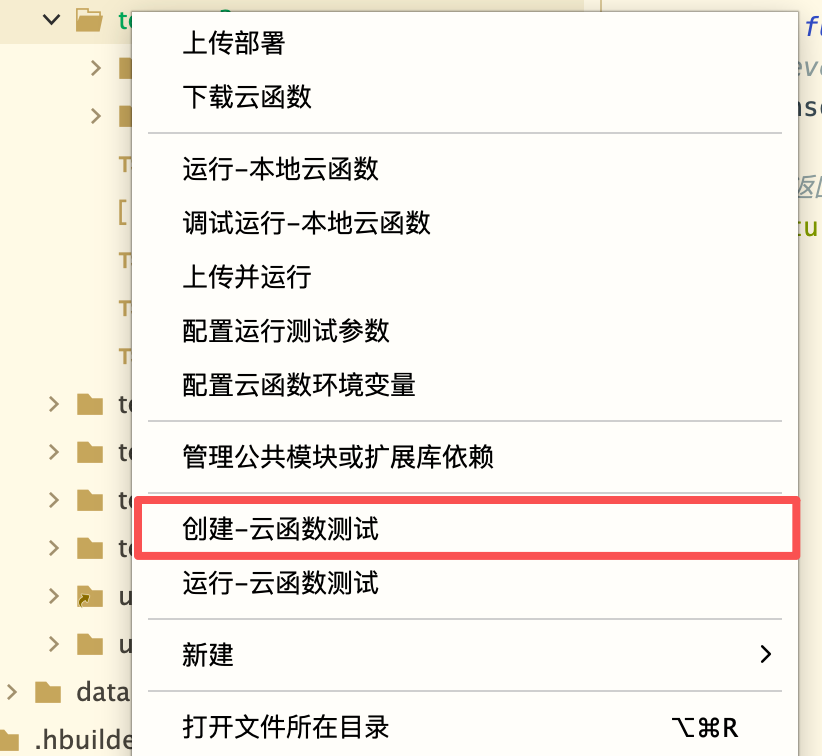
在弹出的对话框中,可以选择:
.test.js / .test.ts)或集成测试(.itest.js / .itest.ts)。扩展名与云函数/云对象使用的语言一致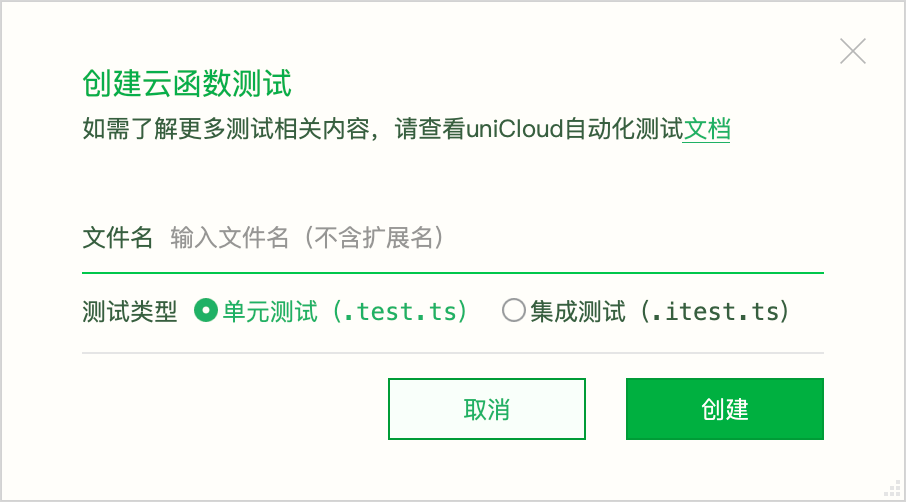
创建好测试文件后,有以下方式运行:
方式一:右键菜单运行(推荐)
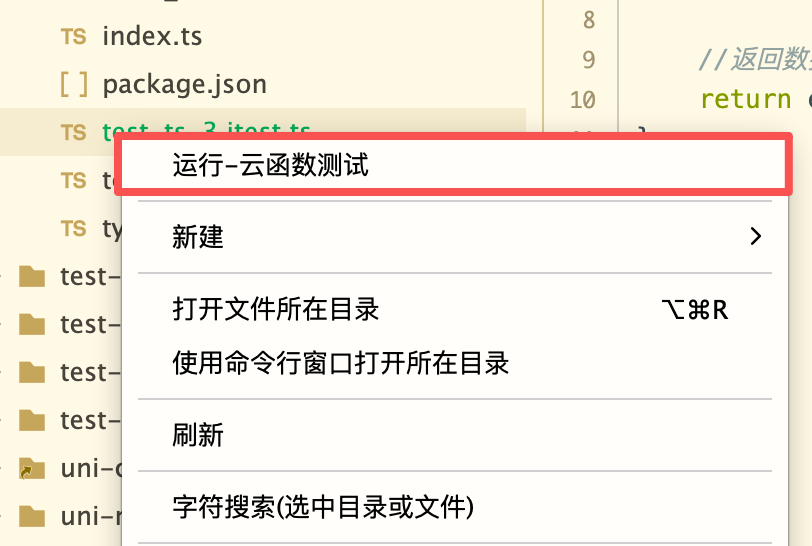
在项目管理器中,右键点击测试文件(.test.js / .test.ts / .itest.js / .itest.ts)或云函数目录,选择 「运行测试」:
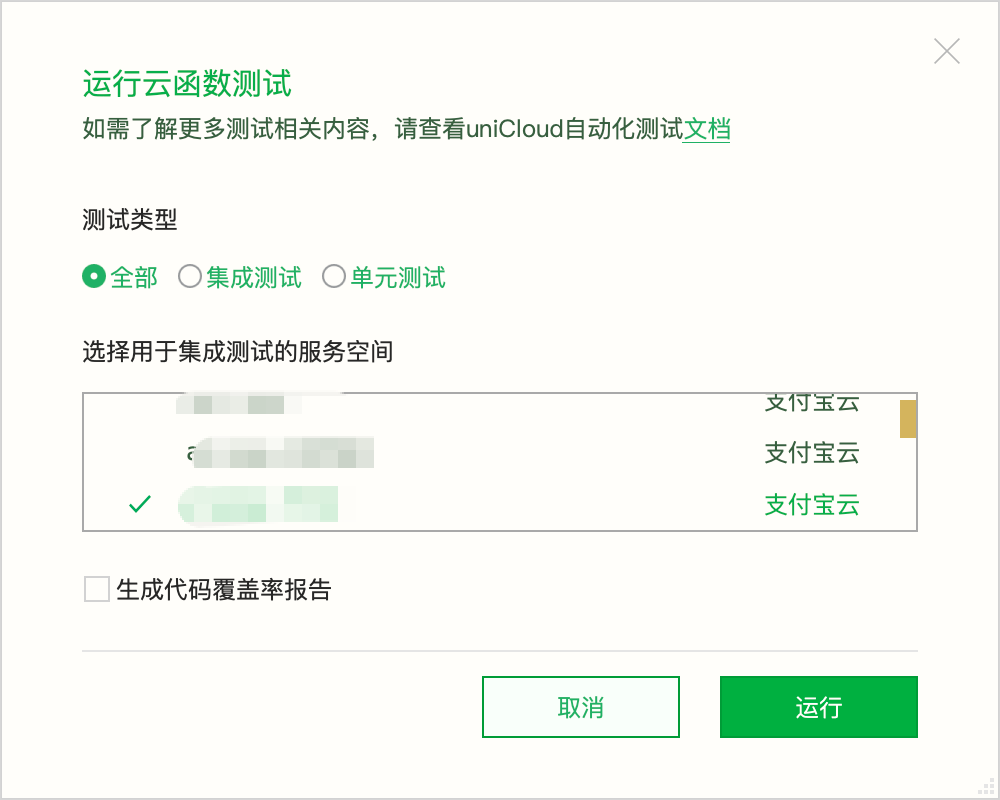
测试结果会在 HBuilderX 的 「uniCloud Test Runner」 输出面板中显示:

方式二:CLI 命令行运行
使用 HBuilderX CLI 在终端中使用 cli unicloud test 命令:
cli unicloud test --prj <项目名称> --provider <服务商>
uniCloud 测试通过文件名后缀区分测试模式:
| 后缀 | 模式 | 说明 |
|---|---|---|
*.test.js / *.test.ts | 单元测试 | 数据库、外部请求等依赖可控,无需联网 |
*.itest.js / *.itest.ts | 集成测试 | 连接真实空间 |
测试文件应放置在对应的云函数/云对象目录下:
uniCloud-aliyun/cloudfunctions/
  user/
    index.obj.js        # 云对象源码
    user.test.js        # 云函数单元测试
    user.itest.js       # 云函数集成测试
  order/
    index.ts            # TypeScript 云函数源码
    order.test.ts       # TypeScript 云函数单元测试
注意:这里的"云函数单元测试"是指在 uniCloud 运行时中单独运行云函数/云对象,并对数据库、HTTP 请求、扩展库、公共模块等外部依赖进行 mock,不是与 uni-app 前端的单元测试。云函数单元测试仅验证云函数/云对象的业务逻辑,不涉及前端页面和客户端交互。
云函数单元测试下,数据库、HTTP 请求、扩展库、公共模块等外部依赖会被替换为可控的 mock 对象。云函数或云对象通过 uniCloud.callFunction 调用项目内其他云函数时,默认在同一进程中执行本地目标,也可以使用 mockFunction 接管调用。整个过程不依赖本地服务端口。
// user.test.js
describe('user.login', () => {
  test('登录成功', async () => {
    // 配置数据库 mock 返回值
    uniCloudTest.db.collection('user').get
      .mockResolvedValue({ data: [{ _id: '1', username: 'neo', pwd: '123456' }] })

    const user = uniCloudTest.importObject('user')
    const res = await user.login({ username: 'neo', pwd: '123456' })

    expect(res).toEqual({ code: 0, token: 'token-1' })
  })

  test('密码错误', async () => {
    uniCloudTest.db.collection('user').get
      .mockResolvedValue({ data: [{ _id: '1', username: 'neo', pwd: '123456' }] })

    const user = uniCloudTest.importObject('user')
    const res = await user.login({ username: 'neo', pwd: 'wrong' })

    expect(res.code).toBe(1)
  })
})
数据库 mock 的每个操作(get、add、update、remove 等)都是一个 mock 函数,可以断言其调用参数:
test('应该按 username 查询', async () => {
  uniCloudTest.db.collection('user').get
    .mockResolvedValue({ data: [{ _id: '1', username: 'neo' }] })

  const user = uniCloudTest.importObject('user')
  await user.login({ username: 'neo', pwd: '123456' })

  // 断言查询条件
  expect(uniCloudTest.db.collection('user').get)
    .toHaveBeenCalledWith(expect.objectContaining({
      collection: 'user',
      where: { username: 'neo' }
    }))
})
test('数据库异常时返回错误', async () => {
  uniCloudTest.db.collection('user').get
    .mockRejectedValue(new Error('database query failed'))

  const user = uniCloudTest.importObject('user')
  const res = await user.login({ username: 'neo', pwd: '123456' })

  expect(res.code).toBe(-1)
})
注意:这里的"云函数集成测试"是指在 uniCloud 运行时中单独运行云函数/云对象并连接真实服务空间进行测试,不是与 uni-app 前端的大集成测试。云函数集成测试仅验证云函数/云对象的业务逻辑,不涉及前端页面和客户端交互。
云函数集成测试连接开发者自备的真实测试空间,数据库永远真实、不可 mock。适合验证端到端的业务流程。
云函数集成测试需要真实的服务空间凭据。在 HBuilderX 中运行时,凭据会自动从项目绑定的服务空间获取。通过 CLI 运行时,需要通过 --space 参数指定服务空间。
云函数集成测试通过 seed 和 cleanup 管理测试数据:
// user.itest.js
describe('user.login(真实空间)', () => {
  test('seed → 真实查询 → cleanup', async () => {
    // 准备测试数据
    await uniCloudTest.seed(async (db) => {
      await db.collection('user').add({ _id: 'test-1', username: 'neo', pwd: '123456' })
    })

    // 真实调用
    const user = uniCloudTest.importObject('user')
    const res = await user.login({ username: 'neo', pwd: '123456' })

    expect(res.code).toBe(0)

    // 清理测试数据
    await uniCloudTest.cleanup(async (db) => {
      await db.collection('user').where({ _id: 'test-1' }).remove()
    })
  })
})
注意
seed / cleanup 中的 db 是真实的 uniCloud.database(),不是 mock_id(如 test-1),方便清理和避免数据残留uniCloudTest.db.* 的 mock 配置,会被忽略并警告为避免上次测试失败遗留脏数据,建议在 seed 前先 cleanup:
test('登录测试', async () => {
  // 先清理可能的残留数据
  await uniCloudTest.cleanup(async (db) => {
    await db.collection('user').where({ _id: 'test-1' }).remove()
  })

  // 再准备数据
  await uniCloudTest.seed(async (db) => {
    await db.collection('user').add({ _id: 'test-1', username: 'neo', pwd: '123456' })
  })

  // ... 测试逻辑 ...

  // 最终清理
  await uniCloudTest.cleanup(async (db) => {
    await db.collection('user').where({ _id: 'test-1' }).remove()
  })
})
导入云对象,返回可直接调用方法的代理。
const obj = uniCloudTest.importObject('云对象名', options?)
const result = await obj.methodName(params)
| 参数 | 类型 | 说明 |
|---|---|---|
name | string | 云对象名称 |
options | object | 可选,见下表 |
options 可选项:
| 属性 | 类型 | 说明 |
|---|---|---|
token | string | uni-id token,云对象内通过 this.getUniIdToken() 获取 |
// 模拟带 token 的客户端调用
const obj = uniCloudTest.importObject('user', { token: 'my-token' })
const res = await obj.whoami()
// res.token === 'my-token'
调用云函数。
const result = await uniCloudTest.callFunction('云函数名', data?, options?)
| 参数 | 类型 | 说明 |
|---|---|---|
name | string | 云函数名称 |
data | any | 传入云函数的数据 |
options | object | 可选,同 importObject 的 options |
触发定时任务。云对象走 _timing 生命周期钩子。
await uniCloudTest.triggerTiming('定时任务名', event?)
| 参数 | 类型 | 说明 |
|---|---|---|
name | string | 云函数/云对象名称 |
event | object | 可选,包含 triggerTime 和 triggerName |
触发 URL 化 / HTTP 调用。
const result = await uniCloudTest.triggerHttp(name, httpEvent?, options?)
| 参数 | 类型 | 说明 |
|---|---|---|
name | string | 云函数/云对象名称 |
httpEvent | string | object | 请求描述,详见下方说明 |
options | object | 可选,同 importObject 的 options |
httpEvent 支持两种传入形式:
形式一:路径字符串(最简写法)
传入 URL 路径,默认为 GET 请求。支持在路径中携带查询参数。
// GET 请求
await uniCloudTest.triggerHttp('http', '/api/data?foo=bar&name=neo')
内部会自动解析为:
{
  path: '/api/data',
  httpMethod: 'GET',
  headers: {},
  queryStringParameters: { foo: 'bar', name: 'neo' },
  body: null,
  isBase64Encoded: false
}
形式二:请求对象(需要 POST / 自定义 headers 等场景)
await uniCloudTest.triggerHttp('http', {
  path: '/api/data?foo=bar',
  method: 'POST',
  headers: { 'Content-Type': 'application/json' },
  body: JSON.stringify({ key: 'value' })
})
请求对象的字段说明:
| 字段 | 类型 | 必填 | 默认值 | 说明 |
|---|---|---|---|---|
path | string | 是 | — | 请求路径,支持在路径中携带查询参数,如 '/api/data?foo=bar' |
method | string | 否 | 'GET' | HTTP 方法:GET、POST、PUT、DELETE 等 |
headers | Record<string, string> | 否 | {} | 请求头 |
body | string | Buffer | ArrayBuffer | 否 | null | 请求体,详见下方 body 处理说明 |
body 支持三种类型,处理方式不同:
| body 类型 | 处理方式 | isBase64Encoded |
|---|---|---|
string | 原样传递,适用于 JSON 文本 | false |
Buffer | 转为 base64 字符串 | true |
ArrayBuffer | 先转为 Buffer,再转为 base64 字符串 | true |
// JSON 文本 body(string)
await uniCloudTest.triggerHttp('http', {
  path: '/api/data',
  method: 'POST',
  headers: { 'Content-Type': 'application/json' },
  body: JSON.stringify({ name: 'neo', age: 18 })
})

// 二进制 body(Buffer)
await uniCloudTest.triggerHttp('http', {
  path: '/api/upload',
  method: 'POST',
  headers: { 'Content-Type': 'application/octet-stream' },
  body: Buffer.from([0x89, 0x50, 0x4e, 0x47])
})
通过 options.token 可模拟带 uni-id token 的请求,云对象/云函数内通过 this.getUniIdToken() 获取:
await uniCloudTest.triggerHttp('http', '/api/profile', { token: 'my-uni-id-token' })
// GET 请求 + 查询参数
const res1 = await uniCloudTest.triggerHttp('http', '/api/users?page=1&size=10')

// POST + JSON body
const res2 = await uniCloudTest.triggerHttp('http', {
  path: '/api/users',
  method: 'POST',
  headers: { 'Content-Type': 'application/json' },
  body: JSON.stringify({ username: 'neo', role: 'admin' })
})

// PUT + 自定义 header
const res3 = await uniCloudTest.triggerHttp('http', {
  path: '/api/users/123',
  method: 'PUT',
  headers: {
    'Content-Type': 'application/json',
    'Authorization': 'Bearer token-xxx'
  },
  body: JSON.stringify({ role: 'editor' })
})

// DELETE 请求
const res4 = await uniCloudTest.triggerHttp('http', {
  path: '/api/users/123',
  method: 'DELETE'
})
数据库 mock 操作即 vi.fn(vitest 的 mock 函数),支持 mockResolvedValue、mockImplementation、toHaveBeenCalledWith 等全部 vitest 原生 API。
// 配置返回值
uniCloudTest.db.collection('user').get.mockResolvedValue({ data: [{ _id: '1' }] })
uniCloudTest.db.collection('order').add.mockRejectedValue(new Error('余额不足'))

// 条件返回
uniCloudTest.db.collection('user').get.mockImplementation(query => {
  if (query.where?.vip) {
    return { data: [{ _id: '1', vip: true }] }
  }
  return { data: [] }
})
可 mock 的数据库操作:
| 操作 | 说明 |
|---|---|
get | 查询文档 |
count | 计数 |
add | 新增文档 |
update | 更新文档 |
set | 设置文档 |
remove | 删除文档 |
aggregate | 聚合操作 |
mock uniCloud.* 上的扩展库能力(redis、推送、短信、AI 等):
// Redis
uniCloudTest.mock('redis', () => ({
  get: async () => 'cached-value',
  set: async () => 'OK'
}))

// AI 扩展
uniCloudTest.mock('ai', () => ({ llm: 'qwen' }))

// 文件 URL
uniCloudTest.mock('getTempFileURL', () => ({
  fileList: [{ tempFileURL: 'https://example.com/file.pdf' }]
}))
支持 mock 的扩展库:redis、getPushManager、sendSms、getPhoneNumber、ai、getExtStorageManager、getLiveManager、getTempFileURL 等。
mock require() 导入的公共模块或第三方包:
// mock uni-id-common
uniCloudTest.mockModule('uni-id-common', {
  checkToken: () => ({ uid: 'user-1', role: ['admin'] })
})

// mock 第三方包
uniCloudTest.mockModule('axios', {
  get: async () => ({ data: { success: true } }),
  post: async () => ({ data: { id: 1 } })
})
云函数或云对象内调用 uniCloud.callFunction 时,未配置 mock 的目标会在同一测试进程中执行本地代码,不依赖 UNICLOUD_SERVE_PORT。如果只需要隔离目标云函数,可使用 mockFunction 接管调用:
uniCloudTest.mockFunction('send-sms', (data) => ({
  errCode: 0,
  to: data.phoneNumber
}))
mock uniCloud.httpclient、uniCloud.request 等发起的外部 HTTP 请求:
// 使用标准 Web Response(推荐)
uniCloudTest.mockRequest((url, options) => {
  return new Response(JSON.stringify({ ok: true }), {
    status: 200,
    headers: { 'Content-Type': 'application/json' }
  })
})

// 按 URL 返回不同响应
uniCloudTest.mockRequest((url, options) => {
  if (url.includes('/api/user')) {
    return new Response(JSON.stringify({ name: 'neo' }), {
      status: 200,
      headers: { 'Content-Type': 'application/json' }
    })
  }
  return new Response(null, { status: 404 })
})

// 模拟失败重试
let callCount = 0
uniCloudTest.mockRequest(() => {
  if (callCount++ === 0) {
    return new Response(null, { status: 500 })  // 第一次失败
  }
  return new Response('{"ok":1}', {            // 重试成功
    status: 200,
    headers: { 'Content-Type': 'application/json' }
  })
})
Content-Type 自动转换
使用标准 Web Response 时,会根据 Content-Type 自动还原 data 类型:
application/json(含 +json)→ Objectapplication/octet-stream、image/*、audio/*、video/* → Buffer| 类型 | API | 作用对象 |
|---|---|---|
| 数据库 | uniCloudTest.db.collection(name).<op> | uniCloud.database() 链式调用 |
| 扩展库 | uniCloudTest.mock(name, impl) | uniCloud.* 能力 |
| 公共模块 | uniCloudTest.mockModule(name, stub) | require('xxx') |
| 云函数 | uniCloudTest.mockFunction(name, impl) | callFunction / 嵌套调用 |
| 外部请求 | uniCloudTest.mockRequest(impl) | httpclient.request / uniCloud.request |
自动重置
所有 mock 在每个测试用例开始前自动重置(beforeEach),无需手动清理。
除了 HBuilderX 右键菜单,还可以通过 HBuilderX CLI 命令运行测试。
cli unicloud test --prj <项目名称> --provider <服务商> [选项]
| 参数 | 必填 | 说明 |
|---|---|---|
--prj | 是 | 已在 HBuilderX 中打开的项目名称 |
--provider | 是 | 服务商:aliyun / tcb / alipay / dcloud |
--functionName | 否 | 指定云函数/云对象名称;不传时在 cloudfunctions 下查找测试 |
--file | 否 | 指定单个测试文件;相对路径基于 --functionName 对应的云函数目录,不传 --functionName 时基于 cloudfunctions 目录 |
--mode | 否 | 测试模式:unittest(默认)/ integration |
--space | 否 | 云函数集成测试的服务空间名称或 ID(仅 integration 模式) |
--coverage | 否 | 生成代码覆盖率报告 |
不指定 --functionName 和 --file 时,默认运行 uniCloud-{provider}/cloudfunctions 下与当前模式匹配的所有测试。指定 --functionName 但不指定 --file 时,运行该云函数目录下与当前模式匹配的所有测试。
# 运行项目下所有云函数单元测试
cli unicloud test --prj my-project --provider aliyun

# 运行指定测试文件
cli unicloud test --prj my-project --provider aliyun --functionName user --file user.test.js

# 运行指定云函数目录下的全部单元测试
cli unicloud test --prj my-project --provider aliyun --functionName user

# 运行云函数集成测试(指定服务空间)
cli unicloud test --prj my-project --provider aliyun --mode integration --space "测试空间"

# 运行测试并生成代码覆盖率报告
cli unicloud test --prj my-project --provider aliyun --functionName user --file user.test.js --coverage
| 退出码 | 含义 |
|---|---|
0 | 测试通过 |
1 | 测试失败或运行出错 |
运行测试时可以开启代码覆盖率统计,查看被测云函数/云对象和公共模块的代码执行情况。
HBuilderX 右键菜单: 在运行测试的弹窗中勾选「生成代码覆盖率报告」。
CLI 命令行: 添加 --coverage 参数:
cli unicloud test --prj my-project --provider aliyun --functionName user --file user.test.js --coverage
覆盖率统计精确到被测云函数本身,不会包含其他未被测试的云函数。具体包含:
| 类型 | 说明 |
|---|---|
| 云函数源码 | index.js / index.ts 及测试执行到的其他源码 |
| 云对象源码 | index.obj.js / index.obj.ts 及测试执行到的其他源码 |
| 公共模块 | 云函数 package.json 中 file: 开头的依赖 |
测试文件本身(*.test.*、*.itest.*)、node_modules 和已有的 .coverage 目录不会纳入统计。只统计本次测试实际执行到的文件,未被调用的云函数不会出现在报告中。
覆盖率报告为 HTML 页面。测试完成后,输出面板会显示报告入口文件的绝对路径:
--functionName 或右键运行单个云函数时:uniCloud-{provider}/cloudfunctions/<云函数名>/.coverage/index.htmlcloudfunctions 下全部测试时:uniCloud-{provider}/cloudfunctions/.coverage/index.html打开 index.html 后,可以查看语句、分支、函数和代码行覆盖率,并逐级定位到未覆盖的源码。每次运行会清理并重新生成当前测试根目录下的 .coverage 报告。
说明
| 特性 | 云函数单元测试 | 云函数集成测试 |
|---|---|---|
| 文件后缀 | *.test.js / *.test.ts | *.itest.js / *.itest.ts |
| 数据库 | mock,返回值由测试配置 | 真实,不可 mock |
| 外部请求 | mock | 可选择性 mock |
| 扩展库 | mock | 可选择性 mock |
| 公共模块 | mock | 可选择性 mock |
| 项目内嵌套云函数 | 默认执行本地代码,可使用 mockFunction 接管 | 默认执行本地代码,可使用 mockFunction 接管 |
| 网络要求 | 无需联网 | 需要联网 |
| 运行速度 | 快 | 较慢(涉及真实网络调用) |
| 适用场景 | 业务逻辑验证、快速迭代 | 端到端验证、数据流验证 |
| 数据准备 | mock 配置即可 | 需要 seed / cleanup |
| 代码覆盖率 | 支持 | 支持 |
下面通过两个完整场景演示如何编写云函数/云对象的单元测试和集成测试。
// uniCloud-aliyun/cloudfunctions/create-order/index.js
const db = uniCloud.database()

exports.main = async (event, context) => {
  const { userId, productId, amount } = event

  // 1. 查询用户
  const userRes = await db.collection('user').doc(userId).get()
  if (!userRes.data.length) {
    return { code: -1, message: '用户不存在' }
  }
  const user = userRes.data[0]

  // 2. 校验余额
  if (user.balance < amount) {
    return { code: -2, message: '余额不足' }
  }

  // 3. 创建订单
  const orderRes = await db.collection('order').add({
    userId,
    productId,
    amount,
    status: 'pending',
    createTime: Date.now()
  })

  // 4. 扣减余额
  await db.collection('user').doc(userId).update({
    balance: user.balance - amount
  })

  return { code: 0, orderId: orderRes.id }
}
// uniCloud-aliyun/cloudfunctions/create-order/create-order.test.js
describe('create-order', () => {
  beforeEach(() => {
    // 默认 mock:用户存在且余额充足
    // 注意:控制面不支持 .doc() 链式调用,直接在 collection 上 mock 即可
    // 被测代码中的 db.collection('user').doc(id).get() 和 db.collection('user').get() 共享同一个 mockFn
    uniCloudTest.db.collection('user').get
      .mockResolvedValue({ data: [{ _id: 'user-1', balance: 1000 }] })
    uniCloudTest.db.collection('order').add
      .mockResolvedValue({ id: 'order-1' })
    uniCloudTest.db.collection('user').update
      .mockResolvedValue({ updated: 1 })
  })

  test('创建成功', async () => {
    const res = await uniCloudTest.callFunction('create-order', {
      userId: 'user-1',
      productId: 'product-1',
      amount: 100
    })

    expect(res.code).toBe(0)
    expect(res.orderId).toBe('order-1')

    // 验证扣减了余额
    expect(uniCloudTest.db.collection('user').update)
      .toHaveBeenCalledWith(expect.objectContaining({
        data: { balance: 900 }
      }))
  })

  test('用户不存在', async () => {
    uniCloudTest.db.collection('user').get
      .mockResolvedValue({ data: [] })

    const res = await uniCloudTest.callFunction('create-order', {
      userId: 'not-exist',
      productId: 'product-1',
      amount: 100
    })

    expect(res.code).toBe(-1)
    expect(res.message).toBe('用户不存在')
  })

  test('余额不足', async () => {
    uniCloudTest.db.collection('user').get
      .mockResolvedValue({ data: [{ _id: 'user-1', balance: 50 }] })

    const res = await uniCloudTest.callFunction('create-order', {
      userId: 'user-1',
      productId: 'product-1',
      amount: 100
    })

    expect(res.code).toBe(-2)
    expect(res.message).toBe('余额不足')
  })
})
// uniCloud-aliyun/cloudfunctions/create-order/create-order.itest.js
describe('create-order(真实空间)', () => {
  // 每个测试前清理并准备数据
  beforeEach(async () => {
    await uniCloudTest.cleanup(async (db) => {
      await db.collection('order').where({ userId: 'test-user-1' }).remove()
      await db.collection('user').where({ _id: 'test-user-1' }).remove()
    })
  })

  afterEach(async () => {
    await uniCloudTest.cleanup(async (db) => {
      await db.collection('order').where({ userId: 'test-user-1' }).remove()
      await db.collection('user').where({ _id: 'test-user-1' }).remove()
    })
  })

  test('创建成功 → 验证订单和余额', async () => {
    // 准备:余额 1000
    await uniCloudTest.seed(async (db) => {
      await db.collection('user').add({ _id: 'test-user-1', balance: 1000 })
    })

    // 调用云函数
    const res = await uniCloudTest.callFunction('create-order', {
      userId: 'test-user-1',
      productId: 'product-1',
      amount: 100
    })

    expect(res.code).toBe(0)
    expect(res.orderId).toBeDefined()

    // 验证:订单已创建
    await uniCloudTest.seed(async (db) => {
      const order = await db.collection('order').where({ userId: 'test-user-1' }).get()
      expect(order.data.length).toBe(1)
      expect(order.data[0].amount).toBe(100)

      // 验证:余额已扣减
      const user = await db.collection('user').doc('test-user-1').get()
      expect(user.data[0].balance).toBe(900)
    })
  })

  test('余额不足时订单不应创建', async () => {
    await uniCloudTest.seed(async (db) => {
      await db.collection('user').add({ _id: 'test-user-1', balance: 50 })
    })

    const res = await uniCloudTest.callFunction('create-order', {
      userId: 'test-user-1',
      productId: 'product-1',
      amount: 100
    })

    expect(res.code).toBe(-2)

    // 验证:订单未创建
    await uniCloudTest.seed(async (db) => {
      const order = await db.collection('order').where({ userId: 'test-user-1' }).get()
      expect(order.data.length).toBe(0)
    })
  })
})
// uniCloud-aliyun/cloudfunctions/user/index.obj.js
const db = uniCloud.database()

module.exports = {
  _before() {
    this.token = this.getUniIdToken()
  },

  // 注册
  async register({ username, password }) {
    if (!username || !password) {
      return { code: -1, message: '用户名和密码不能为空' }
    }

    // 检查用户名是否已存在
    const exist = await db.collection('user')
      .where({ username })
      .get()
    if (exist.data.length > 0) {
      return { code: -2, message: '用户名已存在' }
    }

    // 创建用户
    const res = await db.collection('user').add({
      username,
      password, // 实际项目中应加密存储
      balance: 0,
      createTime: Date.now()
    })

    return { code: 0, userId: res.id }
  },

  // 登录
  async login({ username, password }) {
    const res = await db.collection('user')
      .where({ username, password })
      .get()

    if (res.data.length === 0) {
      return { code: -1, message: '用户名或密码错误' }
    }

    return { code: 0, userId: res.data[0]._id }
  },

  // 获取当前用户信息
  async getProfile() {
    if (!this.token) {
      return { code: -1, message: '未登录' }
    }

    const res = await db.collection('user')
      .doc(this.token.uid)
      .get()

    if (!res.data.length) {
      return { code: -2, message: '用户不存在' }
    }

    const { password, ...profile } = res.data[0]
    return { code: 0, data: profile }
  }
}
// uniCloud-aliyun/cloudfunctions/user/user.test.js
describe('user', () => {
  describe('register', () => {
    test('注册成功', async () => {
      // mock:用户名不存在
      uniCloudTest.db.collection('user').get
        .mockResolvedValue({ data: [] })
      uniCloudTest.db.collection('user').add
        .mockResolvedValue({ id: 'new-user-1' })

      const user = uniCloudTest.importObject('user')
      const res = await user.register({ username: 'neo', password: '123456' })

      expect(res.code).toBe(0)
      expect(res.userId).toBe('new-user-1')
    })

    test('用户名已存在', async () => {
      uniCloudTest.db.collection('user').get
        .mockResolvedValue({ data: [{ _id: '1', username: 'neo' }] })

      const user = uniCloudTest.importObject('user')
      const res = await user.register({ username: 'neo', password: '123456' })

      expect(res.code).toBe(-2)
      expect(res.message).toBe('用户名已存在')
    })

    test('参数校验 - 用户名为空', async () => {
      const user = uniCloudTest.importObject('user')
      const res = await user.register({ username: '', password: '123456' })

      expect(res.code).toBe(-1)
      expect(res.message).toBe('用户名和密码不能为空')
    })
  })

  describe('login', () => {
    test('登录成功', async () => {
      uniCloudTest.db.collection('user').get
        .mockResolvedValue({
          data: [{ _id: 'user-1', username: 'neo', password: '123456' }]
        })

      const user = uniCloudTest.importObject('user')
      const res = await user.login({ username: 'neo', password: '123456' })

      expect(res.code).toBe(0)
      expect(res.userId).toBe('user-1')
    })

    test('密码错误', async () => {
      uniCloudTest.db.collection('user').get
        .mockResolvedValue({ data: [] })

      const user = uniCloudTest.importObject('user')
      const res = await user.login({ username: 'neo', password: 'wrong' })

      expect(res.code).toBe(-1)
    })
  })

  describe('getProfile', () => {
    test('获取成功', async () => {
      uniCloudTest.db.collection('user').get
        .mockResolvedValue({
          data: [{ _id: 'user-1', username: 'neo', balance: 100 }]
        })

      const user = uniCloudTest.importObject('user', { token: { uid: 'user-1' } })
      const res = await user.getProfile()

      expect(res.code).toBe(0)
      expect(res.data.username).toBe('neo')
      expect(res.data.balance).toBe(100)
      // 密码不应返回
      expect(res.data.password).toBeUndefined()
    })

    test('未登录', async () => {
      const user = uniCloudTest.importObject('user')
      const res = await user.getProfile()

      expect(res.code).toBe(-1)
      expect(res.message).toBe('未登录')
    })
  })
})
// uniCloud-aliyun/cloudfunctions/user/user.itest.js
describe('user(真实空间)', () => {
  beforeEach(async () => {
    await uniCloudTest.cleanup(async (db) => {
      await db.collection('user').where({ username: 'test-neo' }).remove()
    })
  })

  afterEach(async () => {
    await uniCloudTest.cleanup(async (db) => {
      await db.collection('user').where({ username: 'test-neo' }).remove()
    })
  })

  test('完整流程:注册 → 登录 → 获取信息', async () => {
    const user = uniCloudTest.importObject('user')

    // 1. 注册
    const regRes = await user.register({
      username: 'test-neo',
      password: '123456'
    })
    expect(regRes.code).toBe(0)
    expect(regRes.userId).toBeDefined()

    // 2. 登录
    const loginRes = await user.login({
      username: 'test-neo',
      password: '123456'
    })
    expect(loginRes.code).toBe(0)
    expect(loginRes.userId).toBe(regRes.userId)

    // 3. 获取信息(带 token)
    const userWithToken = uniCloudTest.importObject('user', {
      token: { uid: regRes.userId }
    })
    const profileRes = await userWithToken.getProfile()
    expect(profileRes.code).toBe(0)
    expect(profileRes.data.username).toBe('test-neo')
    expect(profileRes.data.balance).toBe(0)
  })

  test('注册重复用户名应失败', async () => {
    const user = uniCloudTest.importObject('user')

    // 第一次注册
    await user.register({ username: 'test-neo', password: '123456' })

    // 第二次注册同名用户
    const res = await user.register({ username: 'test-neo', password: '654321' })
    expect(res.code).toBe(-2)
    expect(res.message).toBe('用户名已存在')
  })
})
以上示例对应的完整文件结构:
uniCloud-aliyun/cloudfunctions/
  create-order/
    index.js                  # 云函数源码
    create-order.test.js      # 云函数单元测试
    create-order.itest.js     # 云函数集成测试
  user/
    index.obj.js              # 云对象源码
    user.test.js              # 云对象单元测试
    user.itest.js             # 云对象集成测试
被测代码的执行态挂在进程级单例上,不支持并行执行。测试框架已强制串行运行,请勿使用 it.concurrent 等并发语法。
云函数单元测试下以下能力不会真实执行:
startTransaction / runTransaction)以上场景请使用 云函数集成测试。